4. First steps and pymetamodels tutorials

First steps and tutorials on how to use pymetamodels can be found in this section,

4.1. Tutorial case A01: “Sensitivity analysis of a coupled function”

Example of DOE design and sensitivity analysis for a coupled function.

The coupled function is defined as follows,

\begin{equation} Y = 0.5 \cdot X1+X2+0.5 \cdot X1 \cdot X2+5 \cdot sin(X3)+0.2 \cdot X4+0.1 \cdot X5 \end{equation}

The input and output variable for each of the analysis cases are define in the problem definition spreadsheet file (Download: Problem definition spreadsheet file). This definition spreadsheet includes the table with the main cases definition (Table 4.1.1), the table with model input variables (Table 4.1.2) and the table with output variables (Table 4.1.3).

Table 4.1.1 Main cases description for the coupled function tutorial

case

vars sheet

output sheet

samples

sensitivity method

comment

case_0

case_0_vars_sensi

case_out

50.0

DGSM

case_1

case_1_vars_sensi

case_out

50.0

RBD-Fast

Table 4.1.2 Main case input model variables description for the coupled function tutorial

variable

value

min

max

distribution

is_range

cov_un

ud

alias

comment

constrain

comment

X1

1.0

-3.14

3.14

unif

1

0.05

[-]

X1

None

0

var X1

X2

1.0

-3.14

3.14

unif

1

0.05

[-]

X2

None

0

var X2

X3

1.0

-3.14

3.14

unif

1

0.05

[-]

X3

None

0

var X3

X4

1.0

-3.14

3.14

unif

1

0.05

[-]

X4

None

0

var X4

X5

1.0

-3.14

3.14

unif

1

0.05

[-]

X5

None

0

var X5

Table 4.1.3 Main case output model variables description for the coupled function tutorial

variable

value

ud

comment

array

Y

None

m^3

function output

0

The analysis is performed with pymetamodels based on a basic analysis script as follows in test_analysis.py,

Listing 4.1.1 Coupled function test analysis. Sensitivity analysis
  1#!/usr/bin/env python3
  2
  3## Analytical model,
  4##
  5
  6import os, sys, random
  7import numpy as np
  8import gc
  9
 10import pymetamodels
 11import coupled_function_model as model_obj
 12
 13class analysis(object):
 14
 15    """
 16
 17    .. _model_coupled_function:
 18
 19    **Synopsis:**
 20        * Analysis framework with pymetamodels
 21
 22    """
 23
 24    def __init__(self):
 25
 26        ## Initial variables
 27        self.name = "coupled_function"
 28        self.folder_script = os.path.dirname(os.path.realpath(__file__))
 29
 30        self.folder_path_inputs = self.folder_script
 31
 32        self.folder_path_outputs = os.path.join(os.path.join(os.path.join(self.folder_script, os.pardir), "_examples_raw"),self.name + "_out")
 33        if not os.path.exists(self.folder_path_outputs): os.makedirs(self.folder_path_outputs)
 34
 35        self.file_name_inputs = r"configuration_spreadsheet"
 36        self.file_name_outputs = r"outputs"
 37
 38        ## Initialise 
 39        self.mita = pymetamodels.load()
 40        self.mita.logging_start(self.folder_path_outputs)        
 41
 42    def run_model(self):
 43
 44        ## Inputs load
 45        folder_path = self.folder_path_inputs
 46        file_name = self.file_name_inputs
 47        self.mita.read_xls_case(folder_path, file_name, sheet="cases", col_start = 0, row_start = 1, tit_row = 0 )
 48
 49        ## Sampling
 50        for case in self.mita.keys():
 51
 52            ## Run samplimg cases
 53            self.mita.run_sampling_routine(case)
 54
 55            ## Run / Load model
 56            self.model_iteration(case, model_obj)
 57
 58            ## Sensitivity analysis
 59            self.mita.run_sensitivity_analisis(case)
 60            #self.mita.print_dict(self.mita.SiY(case))
 61
 62        ##
 63        self.mita.run_sensitivity_normalization()
 64
 65        ## Ploting and others
 66        for case in self.mita.keys():
 67
 68            ## Plot cross varible relation in the sensitivity analysis
 69            self.mita.output_plts_sensitivity(self.folder_path_outputs, case)
 70
 71        ## Output variables save
 72        folder_path = self.folder_path_outputs
 73        file_name = self.file_name_outputs
 74        out_path = self.mita.output_xls(folder_path, file_name, col_start = 0, tit_row = 0)
 75
 76    def model_iteration(self, case, _model_obj):
 77
 78        ## Model iteration to generate Y doe output values
 79        doeX = self.mita.doeX(case)
 80        doeY = self.mita.doeY(case)
 81        vars_in = self.mita.vars_parameter_matrix(case)
 82        case_dict = self.mita.case[case]
 83        samples = len(doeX[list(doeX.keys())[0]])
 84
 85        for ii in range(0, samples):
 86
 87            obj_model = _model_obj.model_obj()
 88
 89            # initialize dictionaries
 90            obj_model.doeX = doeX
 91            obj_model.doeY = doeY
 92            obj_model.case_dict = case_dict
 93            obj_model.ii = ii
 94            obj_model.vars_in = vars_in
 95
 96            # add variables as atributes
 97            for key in obj_model.doeX.keys():
 98                setattr(obj_model, key, obj_model.doeX[key][obj_model.ii])
 99
100            # run the model for ii sample
101            obj_model.run_model()
102
103if __name__ == "__main__":
104
105    analysis = analysis()
106
107    analysis.run_model()
The analysis frameworks iterates the model defined in a secondary file as follows in coupled_function_model.py,

Listing 4.1.2 Coupled function model code block. Sensitivity analysis
 1#!/usr/bin/env python3
 2
 3## coupled function
 4##
 5
 6import os, sys, random
 7import numpy as np
 8from math import *
 9
10class model_obj(object):
11
12    """
13
14    .. _model_id_001_coupled_function:
15
16    **Coupled_function**
17
18    :platform: Unix, Windows
19    :synopsis: coupled fuction
20    :author: FLC
21
22    :Dependences:
23
24    """
25
26    def __init__(self):
27
28        ## Initial variables
29        self.doeX = None
30        self.doeY = None
31        self.case_dict = None
32        self.ii = None
33
34    def run_model(self):
35
36        # variables
37        X1 = self.doeX["X1"][self.ii]
38        X2 = self.doeX["X2"][self.ii]
39        X3 = self.doeX["X3"][self.ii]
40        X4 = self.doeX["X4"][self.ii]
41        X5 = self.doeX["X5"][self.ii]
42
43        # calculations
44        Y =  0.5*X1+X2+0.5*X1*X2+5*sin(X3)+0.2*X4+0.1*X5
45
46        # outputs
47        self.doeY["Y"][self.ii] = Y
48
49        pass

Running the analysis script generates and output results files containing the DOEX input data, the DOEY output data and the senstitivity analysis,

Download: Output spreadsheet file

The console output of running the tutorial script is as follow,

Msg: Case case_0 sampling value 64 by DGSM. DOEX shape (384, 5)

Msg: Case case_1 sampling value 64 by latin Hypercube for RBD-FAST. DOEX shape (64, 5)

Plot create ID: cross_X1_X2_case_0

Plot create ID: cross_X1_X3_case_0

Plot create ID: cross_X1_X4_case_0

Plot create ID: cross_X1_X5_case_0

Plot create ID: cross_X2_X3_case_0

Plot create ID: cross_X2_X4_case_0

Plot create ID: cross_X2_X5_case_0

Plot create ID: cross_X3_X4_case_0

Plot create ID: cross_X3_X5_case_0

Plot create ID: cross_X4_X5_case_0

Msg: Cross DOEX variable sampling combinations and sensitivity analisys plotted

Plot create ID other: sensi_case_0_Y

Msg: Sensitivity histograms plotted

Plot create ID: cross_X1_X2_case_1

Plot create ID: cross_X1_X3_case_1

Plot create ID: cross_X1_X4_case_1

Plot create ID: cross_X1_X5_case_1

Plot create ID: cross_X2_X3_case_1

Plot create ID: cross_X2_X4_case_1

Plot create ID: cross_X2_X5_case_1

Plot create ID: cross_X3_X4_case_1

Plot create ID: cross_X3_X5_case_1

Plot create ID: cross_X4_X5_case_1

Msg: Cross DOEX variable sampling combinations and sensitivity analisys plotted

Plot create ID other: sensi_case_1_Y

Msg: Sensitivity histograms plotted

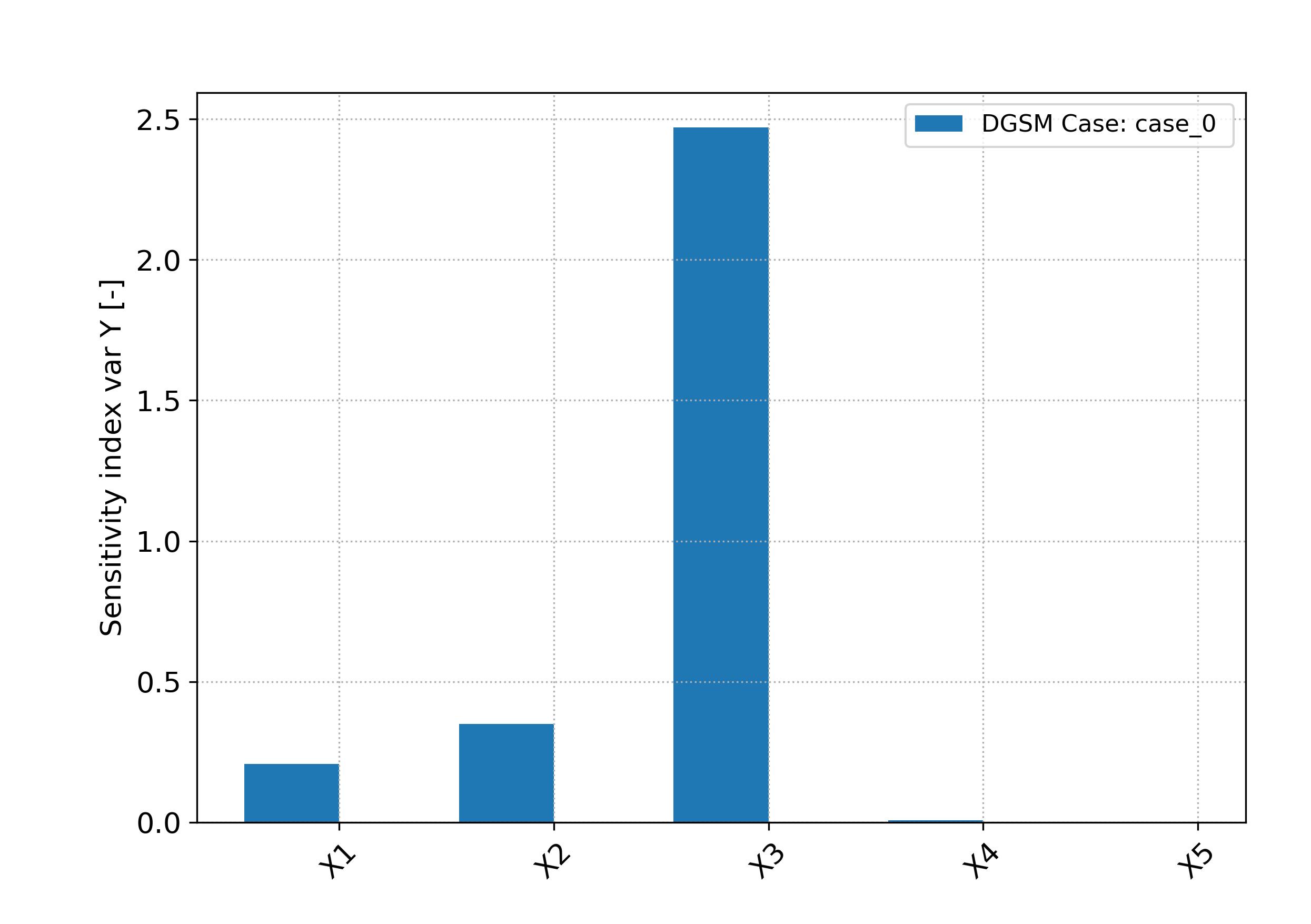
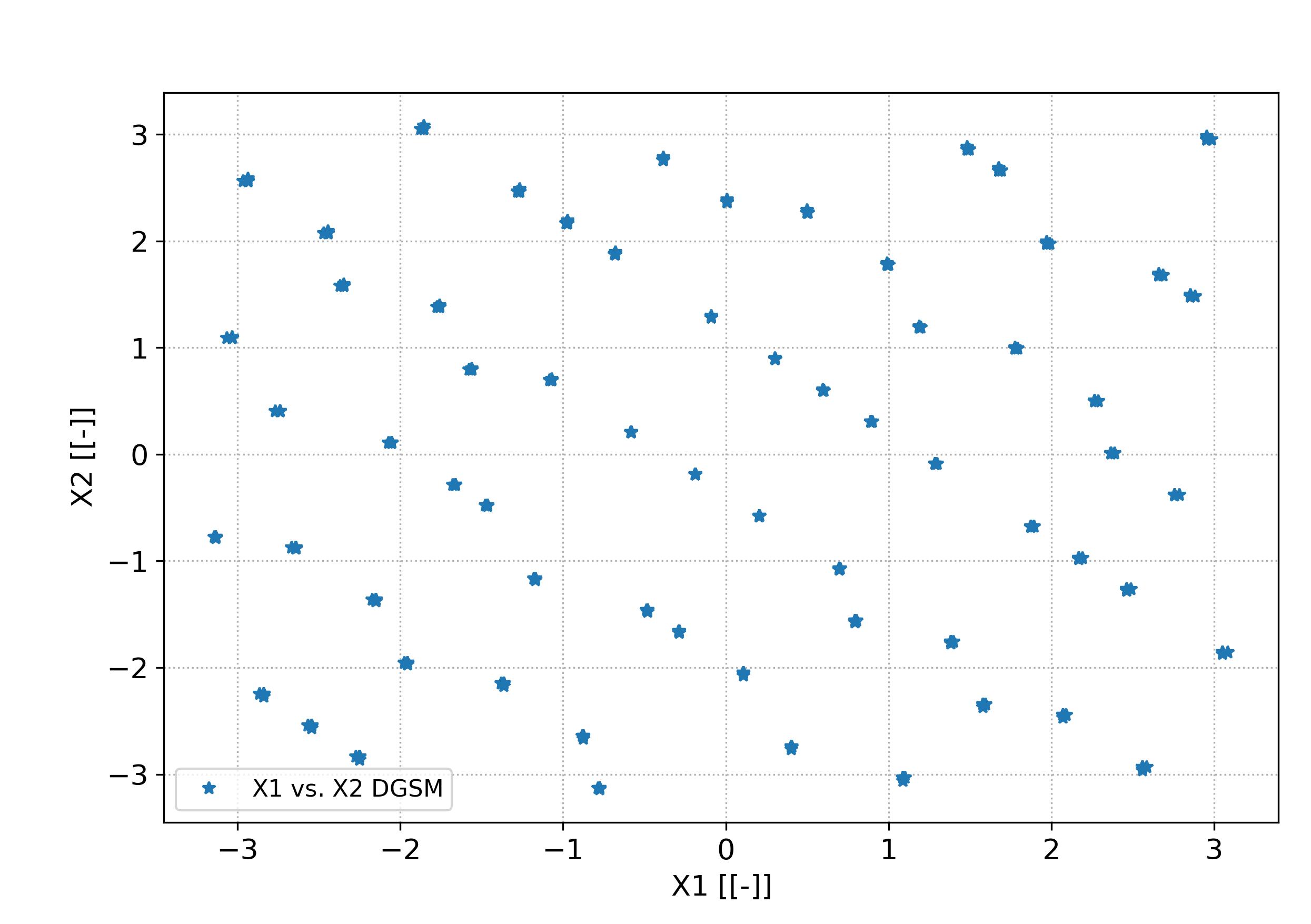
The function output_plts_sensitivity() generates several plots showing the DOEX variables correlation and a summary of the sensitivity analysis. For example this can be seen in Fig. 4.1.1 and Fig. 4.1.2. This plot are located in the output folder.

parse-figure

Fig. 4.1.1 Sensitivity bar plot for case_0. Tutorial A01

parse-figure

Fig. 4.1.2 Cross represenation of variable X1 versus X2 in case_0. Tutorial A01

4.2. Tutorial case A02: “Sensitivity analysis of a coupled function, structure of data objects”

Based on the DOE design and sensitivity analysis for a coupled function described in the previous Tutorial case. In this tutorial are described the data object structure. For this purpose the different data object structure is access and printed.

The input and output variable for each of the analysis cases are define in the problem definition spreadsheet file (Download: Problem definition spreadsheet file). This definition spreadsheet includes the table with the main cases definition (Table 4.1.1), the table with model input variables (Table 4.1.2) and the table with output variables (Table 4.1.3).

Table 4.2.1 Main cases description for the coupled function tutorial data structure

case

vars sheet

output sheet

samples

sensitivity method

comment

case_1

case_1_vars_sensi

case_out

50.0

RBD-Fast

Table 4.2.2 Main case input model variables description for the coupled function tutorial data structure

variable

value

min

max

distribution

is_range

cov_un

ud

alias

comment

constrain

comment

X1

1.0

-3.14

3.14

unif

1

0.05

[-]

X1

None

0

var X1

X2

1.0

-3.14

3.14

unif

1

0.05

[-]

X2

None

0

var X2

X3

1.0

-3.14

3.14

unif

1

0.05

[-]

X3

None

0

var X3

X4

1.0

-3.14

3.14

unif

1

0.05

[-]

X4

None

0

var X4

X5

1.0

-3.14

3.14

unif

1

0.05

[-]

X5

None

0

var X5

Table 4.2.3 Main case output model variables description for the coupled function tutorial data structure

variable

value

ud

comment

array

Y

None

m^3

function output

0

The code to print the data structure objects are described in the script as follows in test_analysis.py,

Listing 4.2.1 Coupled function test analysis. Structure of data objects
  1#!/usr/bin/env python3
  2
  3## Analytical model,
  4##
  5
  6import os, sys, random
  7import numpy as np
  8import gc
  9
 10import pymetamodels
 11import coupled_function_model as model_obj
 12
 13class analysis(object):
 14
 15    """
 16
 17    .. _model_coupled_function_data_struct:
 18
 19    **Synopsis:**
 20        * Analysis framework with pymetamodels
 21
 22    """
 23
 24    def __init__(self):
 25
 26        ## Initial variables
 27        self.name = "coupled_function_data_struct"
 28        self.folder_script = os.path.dirname(os.path.realpath(__file__))
 29
 30        self.folder_path_inputs = self.folder_script
 31
 32        self.folder_path_outputs = os.path.join(os.path.join(os.path.join(self.folder_script, os.pardir), "_examples_raw"),self.name + "_out")
 33        if not os.path.exists(self.folder_path_outputs): os.makedirs(self.folder_path_outputs)
 34
 35        self.file_name_inputs = r"configuration_spreadsheet"
 36        self.file_name_outputs = r"outputs"
 37
 38        ## Initialise 
 39        self.mita = pymetamodels.load()
 40        self.mita.logging_start(self.folder_path_outputs)        
 41
 42    def run_model(self):
 43
 44        ## Inputs load
 45        folder_path = self.folder_path_inputs
 46        file_name = self.file_name_inputs
 47        self.mita.read_xls_case(folder_path, file_name, sheet="cases", col_start = 0, row_start = 1, tit_row = 0 )
 48
 49        ## Sampling
 50        for case in self.mita.keys():
 51
 52            ## Run samplimg cases
 53            self.mita.run_sampling_routine(case)
 54
 55            ## Run / Load model
 56            self.model_iteration(case, model_obj)
 57
 58            ## Sensitivity analysis
 59            self.mita.run_sensitivity_analisis(case)
 60
 61        ##
 62        self.mita.run_sensitivity_normalization()
 63
 64        ## Print data structure for investigation
 65        for case in self.mita.keys():
 66            print("*:-)* Printing data object structure for case %s" % case)
 67            self.mita.print_structure(case)
 68
 69        ## Print data structure for investigation
 70        for case in self.mita.keys():
 71            print("*:-)* Printing DOEX data object structure for case %s" % case)
 72            self.mita.print_dict(self.mita.doeX(case))
 73
 74        ## Print data structure for investigation
 75        for case in self.mita.keys():
 76            print("*:-)* Printing DOEY data object structure for case %s" % case)
 77            self.mita.print_dict(self.mita.doeX(case))
 78
 79        ## Print data structure for investigation
 80        for case in self.mita.keys():
 81            print("*:-)* Printing sensitivity SiY data object structure for case %s" % case)
 82            self.mita.print_dict(self.mita.SiY(case))
 83
 84        ## Print data structure for investigation
 85        for case in self.mita.keys():
 86            print("*:-)* Printing parameters values for each input variable data object structure for case %s" % case)
 87            self.mita.print_dict(self.mita.vars_parameter_matrix(case))
 88
 89
 90
 91        ## Output variables save
 92        folder_path = self.folder_path_outputs
 93        file_name = self.file_name_outputs
 94        out_path = self.mita.output_xls(folder_path, file_name, col_start = 0, tit_row = 0)
 95
 96    def model_iteration(self, case, _model_obj):
 97
 98        ## Model iteration to generate Y doe output values
 99        doeX = self.mita.doeX(case)
100        doeY = self.mita.doeY(case)
101        vars_in = self.mita.vars_parameter_matrix(case)
102        case_dict = self.mita.case[case]
103        samples = len(doeX[list(doeX.keys())[0]])
104
105        for ii in range(0, samples):
106
107            obj_model = _model_obj.model_obj()
108
109            # initialize dictionaries
110            obj_model.doeX = doeX
111            obj_model.doeY = doeY
112            obj_model.case_dict = case_dict
113            obj_model.ii = ii
114            obj_model.vars_in = vars_in
115
116            # add variables as atributes
117            for key in obj_model.doeX.keys():
118                setattr(obj_model, key, obj_model.doeX[key][obj_model.ii])
119
120            # run the model for ii sample
121            obj_model.run_model()
122
123if __name__ == "__main__":
124
125    analysis = analysis()
126
127    analysis.run_model()
The console output of running the tutorial script is as follow,

Msg: Case case_1 sampling value 32 by latin Hypercube for RBD-FAST. DOEX shape (32, 5)

*:-)* Printing data object structure for case case_1

Msg: Data dict structure

Msg:   case = case_1

Msg:   vars sheet = case_1_vars_sensi

Msg:   output sheet = case_out

Msg:   samples = 32.0

Msg:   sensitivity method = RBD-Fast

Msg:   comment =

Msg:   [vars]

Msg:     X1 = 1.0

Msg:     [[op_X1]]

Msg:       value = 1.0

Msg:       min = -3.14

Msg:       max = 3.14

Msg:       distribution = unif

Msg:       is_range = 1

Msg:       cov_un = 0.05

Msg:       ud = [-]

Msg:       alias = X1

Msg:       comment = var X1

Msg:       constrain = 0

Msg:     X2 = 1.0

Msg:     [[op_X2]]

Msg:       value = 1.0

Msg:       min = -3.14

Msg:       max = 3.14

Msg:       distribution = unif

Msg:       is_range = 1

Msg:       cov_un = 0.05

Msg:       ud = [-]

Msg:       alias = X2

Msg:       comment = var X2

Msg:       constrain = 0

Msg:     X3 = 1.0

Msg:     [[op_X3]]

Msg:       value = 1.0

Msg:       min = -3.14

Msg:       max = 3.14

Msg:       distribution = unif

Msg:       is_range = 1

Msg:       cov_un = 0.05

Msg:       ud = [-]

Msg:       alias = X3

Msg:       comment = var X3

Msg:       constrain = 0

Msg:     X4 = 1.0

Msg:     [[op_X4]]

Msg:       value = 1.0

Msg:       min = -3.14

Msg:       max = 3.14

Msg:       distribution = unif

Msg:       is_range = 1

Msg:       cov_un = 0.05

Msg:       ud = [-]

Msg:       alias = X4

Msg:       comment = var X4

Msg:       constrain = 0

Msg:     X5 = 1.0

Msg:     [[op_X5]]

Msg:       value = 1.0

Msg:       min = -3.14

Msg:       max = 3.14

Msg:       distribution = unif

Msg:       is_range = 1

Msg:       cov_un = 0.05

Msg:       ud = [-]

Msg:       alias = X5

Msg:       comment = var X5

Msg:       constrain = 0

Msg:   [vars_out]

Msg:     Y = None

Msg:     [[op_Y]]

Msg:       value = None

Msg:       ud = m^3

Msg:       comment = function output

Msg:       array = 0

Msg:   [problem]

Msg:     num_vars = 5

Msg:     names = ['X1', 'X2', 'X3', 'X4', 'X5']

Msg:     bounds = [[-3.14, 3.14], [-3.14, 3.14], [-3.14, 3.14], [-3.14, 3.14], [-3.14, 3.14]]

Msg:     dists = ['unif', 'unif', 'unif', 'unif', 'unif']

Msg:   [DOE_X]

Msg:     X1 = [-1.59159879 -2.37095574 -2.71348644  1.22365411  2.82674911  0.2999615

  1.64725384  3.06161963  0.0742446  -2.28582998 -0.5587558  -1.82735767

 -1.31195326 -0.73077891  0.75394008 -0.99513504  0.8585848   2.45169679

  1.04023371  2.00955945 -3.0356118   1.89134424  1.49386002 -1.48587271

 -0.3298623   2.27657763 -2.14167914  0.47383463  2.55339845 -2.79819403

 -0.13323825 -0.80025798]

Msg:     X2 = [-1.49551768 -0.8232943   1.45585999 -2.96500852 -2.79608774  1.68019528

  1.81664636  2.22034641 -1.98682384 -1.00425972  2.66093103  2.76958816

 -2.20322023  0.13209743  0.7739977  -2.46343011 -1.25010436 -1.81424892

  2.40325057  0.87549163  0.35403306 -0.29919076  0.50626936 -0.70882351

 -0.02008361  3.11491833 -1.63528101 -0.55444911  1.10362982  2.04131733

  1.29687707 -2.63321811]

Msg:     X3 = [ 3.09699711  0.36966734 -0.57002289  1.50708007 -2.06922857  2.59258339

  0.19526522  1.64727312  1.96053652  0.97968859  2.81016127  2.53623619

 -3.00942706 -0.03068597 -0.92978557  2.224929    0.72726221  1.15537941

  1.23089618 -2.69491643 -2.7600673   2.02552516 -1.70788011 -2.27872345

 -2.36979067 -1.83677336 -0.73435615 -1.33261221 -1.01794021  0.53264105

 -1.41922755 -0.27131973]

Msg:     X4 = [-1.11656159  2.38923358 -2.75328799 -0.73142989  1.9493782  -0.82977894

  2.66457292  1.62690883  1.13595146 -0.56011449 -3.02408628  1.28223654

 -1.5666057   0.72028    -1.76033609 -0.12151199 -2.11662127 -2.18896799

 -0.21834053 -2.73883853  0.8447891   1.56912015 -1.87223673  2.04052934

  0.05035915 -2.51172914  3.03296838  2.30608184 -1.31902097  2.8707176

  0.57524509  0.28542285]

Msg:     X5 = [ 1.77889941 -1.99855931 -2.70658724 -2.47096652  3.0536835  -1.52908215

 -1.23152489  2.79263289  1.12450616 -2.90457174 -2.27649904 -0.88224136

  0.80567234 -1.69888088 -0.37545943 -0.77885064 -3.05102585  2.26839659

  0.55485414  1.74350232  1.37418039  0.02608228  0.3231309  -0.18227989

  0.60608273  1.31272188  1.98604421  2.60130571 -1.80306878 -0.54575217

  2.53868527 -1.10464129]

Msg:   [DOE_Y]

Msg:     Y = [-0.9237036   1.05174211 -5.39568432  0.42921752 -9.031054    4.37252071

  5.5164078  12.74011474  2.94122292  2.74974805  2.43266487  2.33889456

 -2.30559556 -0.46079688 -2.95433012  2.13041757  1.23823595  1.55139212

  8.89909567  0.22667888 -3.25643334  5.17187807 -3.66388073 -4.33382832

 -3.59816108  2.60362946 -3.50034583 -4.58638352 -0.90991966  0.84483907

 -3.42989846 -3.37311535]

Msg:   [Si_Y]

Msg:     [[Y]]

Msg:       S1 = [-0.8285000582672463, 0.1440109719362379, 0.6543986801275722, -0.08063536354778456, -0.08401437790256483]

Msg:       S1_conf = [0.0, 0.0, 0.0, 0.0, 0.0]

Msg:       names = ['X1', 'X2', 'X3', 'X4', 'X5']

*:-)* Printing DOEX data object structure for case case_1

Msg:   X1 = [-1.59159879 -2.37095574 -2.71348644  1.22365411  2.82674911  0.2999615

  1.64725384  3.06161963  0.0742446  -2.28582998 -0.5587558  -1.82735767

 -1.31195326 -0.73077891  0.75394008 -0.99513504  0.8585848   2.45169679

  1.04023371  2.00955945 -3.0356118   1.89134424  1.49386002 -1.48587271

 -0.3298623   2.27657763 -2.14167914  0.47383463  2.55339845 -2.79819403

 -0.13323825 -0.80025798]

Msg:   X2 = [-1.49551768 -0.8232943   1.45585999 -2.96500852 -2.79608774  1.68019528

  1.81664636  2.22034641 -1.98682384 -1.00425972  2.66093103  2.76958816

 -2.20322023  0.13209743  0.7739977  -2.46343011 -1.25010436 -1.81424892

  2.40325057  0.87549163  0.35403306 -0.29919076  0.50626936 -0.70882351

 -0.02008361  3.11491833 -1.63528101 -0.55444911  1.10362982  2.04131733

  1.29687707 -2.63321811]

Msg:   X3 = [ 3.09699711  0.36966734 -0.57002289  1.50708007 -2.06922857  2.59258339

  0.19526522  1.64727312  1.96053652  0.97968859  2.81016127  2.53623619

 -3.00942706 -0.03068597 -0.92978557  2.224929    0.72726221  1.15537941

  1.23089618 -2.69491643 -2.7600673   2.02552516 -1.70788011 -2.27872345

 -2.36979067 -1.83677336 -0.73435615 -1.33261221 -1.01794021  0.53264105

 -1.41922755 -0.27131973]

Msg:   X4 = [-1.11656159  2.38923358 -2.75328799 -0.73142989  1.9493782  -0.82977894

  2.66457292  1.62690883  1.13595146 -0.56011449 -3.02408628  1.28223654

 -1.5666057   0.72028    -1.76033609 -0.12151199 -2.11662127 -2.18896799

 -0.21834053 -2.73883853  0.8447891   1.56912015 -1.87223673  2.04052934

  0.05035915 -2.51172914  3.03296838  2.30608184 -1.31902097  2.8707176

  0.57524509  0.28542285]

Msg:   X5 = [ 1.77889941 -1.99855931 -2.70658724 -2.47096652  3.0536835  -1.52908215

 -1.23152489  2.79263289  1.12450616 -2.90457174 -2.27649904 -0.88224136

  0.80567234 -1.69888088 -0.37545943 -0.77885064 -3.05102585  2.26839659

  0.55485414  1.74350232  1.37418039  0.02608228  0.3231309  -0.18227989

  0.60608273  1.31272188  1.98604421  2.60130571 -1.80306878 -0.54575217

  2.53868527 -1.10464129]

*:-)* Printing DOEY data object structure for case case_1

Msg:   X1 = [-1.59159879 -2.37095574 -2.71348644  1.22365411  2.82674911  0.2999615

  1.64725384  3.06161963  0.0742446  -2.28582998 -0.5587558  -1.82735767

 -1.31195326 -0.73077891  0.75394008 -0.99513504  0.8585848   2.45169679

  1.04023371  2.00955945 -3.0356118   1.89134424  1.49386002 -1.48587271

 -0.3298623   2.27657763 -2.14167914  0.47383463  2.55339845 -2.79819403

 -0.13323825 -0.80025798]

Msg:   X2 = [-1.49551768 -0.8232943   1.45585999 -2.96500852 -2.79608774  1.68019528

  1.81664636  2.22034641 -1.98682384 -1.00425972  2.66093103  2.76958816

 -2.20322023  0.13209743  0.7739977  -2.46343011 -1.25010436 -1.81424892

  2.40325057  0.87549163  0.35403306 -0.29919076  0.50626936 -0.70882351

 -0.02008361  3.11491833 -1.63528101 -0.55444911  1.10362982  2.04131733

  1.29687707 -2.63321811]

Msg:   X3 = [ 3.09699711  0.36966734 -0.57002289  1.50708007 -2.06922857  2.59258339

  0.19526522  1.64727312  1.96053652  0.97968859  2.81016127  2.53623619

 -3.00942706 -0.03068597 -0.92978557  2.224929    0.72726221  1.15537941

  1.23089618 -2.69491643 -2.7600673   2.02552516 -1.70788011 -2.27872345

 -2.36979067 -1.83677336 -0.73435615 -1.33261221 -1.01794021  0.53264105

 -1.41922755 -0.27131973]

Msg:   X4 = [-1.11656159  2.38923358 -2.75328799 -0.73142989  1.9493782  -0.82977894

  2.66457292  1.62690883  1.13595146 -0.56011449 -3.02408628  1.28223654

 -1.5666057   0.72028    -1.76033609 -0.12151199 -2.11662127 -2.18896799

 -0.21834053 -2.73883853  0.8447891   1.56912015 -1.87223673  2.04052934

  0.05035915 -2.51172914  3.03296838  2.30608184 -1.31902097  2.8707176

  0.57524509  0.28542285]

Msg:   X5 = [ 1.77889941 -1.99855931 -2.70658724 -2.47096652  3.0536835  -1.52908215

 -1.23152489  2.79263289  1.12450616 -2.90457174 -2.27649904 -0.88224136

  0.80567234 -1.69888088 -0.37545943 -0.77885064 -3.05102585  2.26839659

  0.55485414  1.74350232  1.37418039  0.02608228  0.3231309  -0.18227989

  0.60608273  1.31272188  1.98604421  2.60130571 -1.80306878 -0.54575217

  2.53868527 -1.10464129]

*:-)* Printing sensitivity SiY data object structure for case case_1

Msg:   [Y]

Msg:     S1 = [-0.8285000582672463, 0.1440109719362379, 0.6543986801275722, -0.08063536354778456, -0.08401437790256483]

Msg:     S1_conf = [0.0, 0.0, 0.0, 0.0, 0.0]

Msg:     names = ['X1', 'X2', 'X3', 'X4', 'X5']

*:-)* Printing parameters values for each input variable data object structure for case case_1

Msg:   [X1]

Msg:     value = 1.0

Msg:     min = -3.14

Msg:     max = 3.14

Msg:     distribution = unif

Msg:     is_range = 1

Msg:     cov_un = 0.05

Msg:     ud = [-]

Msg:     alias = X1

Msg:   [X2]

Msg:     value = 1.0

Msg:     min = -3.14

Msg:     max = 3.14

Msg:     distribution = unif

Msg:     is_range = 1

Msg:     cov_un = 0.05

Msg:     ud = [-]

Msg:     alias = X2

Msg:   [X3]

Msg:     value = 1.0

Msg:     min = -3.14

Msg:     max = 3.14

Msg:     distribution = unif

Msg:     is_range = 1

Msg:     cov_un = 0.05

Msg:     ud = [-]

Msg:     alias = X3

Msg:   [X4]

Msg:     value = 1.0

Msg:     min = -3.14

Msg:     max = 3.14

Msg:     distribution = unif

Msg:     is_range = 1

Msg:     cov_un = 0.05

Msg:     ud = [-]

Msg:     alias = X4

Msg:   [X5]

Msg:     value = 1.0

Msg:     min = -3.14

Msg:     max = 3.14

Msg:     distribution = unif

Msg:     is_range = 1

Msg:     cov_un = 0.05

Msg:     ud = [-]

Msg:     alias = X5

4.3. Tutorial case A03: “Models and metamodels construction of a coupled function”

In this tutorial are described the construction of the model and metamodels, as well as the default plotting of them. For this purpose is used the DOE design and sensitivity analysis for a coupled function described in the previous tutorial case.

The code to print the data structure objects are described in the script as follows in test_analysis.py,

Listing 4.3.1 Coupled function test analysis. Metamodels
  1#!/usr/bin/env python3
  2
  3## Analytical model,
  4##
  5
  6import os, sys, random
  7import numpy as np
  8import gc
  9
 10import pymetamodels
 11import coupled_function_model as model_obj
 12
 13class analysis(object):
 14
 15    """
 16
 17    .. _model_coupled_function_metamodel:
 18
 19    **Synopsis:**
 20        * Analysis framework with pymetamodels
 21        * Coupled function tutorial
 22
 23    """
 24
 25    def __init__(self):
 26
 27        ## Initial variables
 28        self.name = "coupled_function_metamodel"
 29        self.folder_script = os.path.dirname(os.path.realpath(__file__))
 30
 31        self.folder_path_inputs = self.folder_script
 32
 33        self.folder_path_outputs = os.path.join(os.path.join(os.path.join(self.folder_script, os.pardir), "_examples_raw"),self.name + "_out")
 34        if not os.path.exists(self.folder_path_outputs): os.makedirs(self.folder_path_outputs)
 35
 36        self.file_name_inputs = r"configuration_spreadsheet"
 37        self.file_name_outputs = r"outputs"
 38
 39        ## Initialise 
 40        self.mita = pymetamodels.load()
 41        self.mita.logging_start(self.folder_path_outputs)        
 42
 43    def run_model(self):
 44
 45        ## Inputs load
 46        folder_path = self.folder_path_inputs
 47        file_name = self.file_name_inputs
 48        self.mita.read_xls_case(folder_path, file_name, sheet="cases", col_start = 0, row_start = 1, tit_row = 0 )
 49
 50        ## Sampling
 51        for case in self.mita.keys():
 52
 53            ## Run samplimg cases
 54            self.mita.run_sampling_routine(case)
 55
 56            ## Run / Load model
 57            self.model_iteration(case, model_obj)
 58
 59            ## Sensitivity analysis
 60            self.mita.run_sensitivity_analisis(case)
 61
 62            ## Metamodeling construction
 63            #self.mita.run_metamodel_construction(case, scheme = "general")
 64            self.mita.run_metamodel_construction(case, scheme = "general_fast")
 65
 66        ##
 67        self.mita.run_sensitivity_normalization()
 68
 69        ## Ploting and others
 70        for case in self.mita.keys():
 71
 72            ## Plots cross varible relation in the sensitivity analysis
 73            self.mita.output_plts_sensitivity(self.folder_path_outputs, case)
 74
 75            ## Plots showing the model DOEX and DOEY variables relationship 2D XY
 76            self.mita.output_plts_models_XY(self.folder_path_outputs, case)
 77
 78            ## Residual values plots
 79            self.mita.output_plts_models_residuals_plot(self.folder_path_outputs, case)
 80
 81            ## Plots showing the model DOEX and DOEY variables relationship 3D XYZ
 82            self.mita.output_plts_models_XYZ(self.folder_path_outputs, case, scatter=False)
 83
 84        ## Output variables save
 85        folder_path = self.folder_path_outputs
 86        file_name = self.file_name_outputs
 87        out_path = self.mita.output_xls(folder_path, file_name, col_start = 0, tit_row = 0)
 88
 89    def model_iteration(self, case, _model_obj):
 90
 91        ## Model iteration to generate Y doe output values
 92        doeX = self.mita.doeX(case)
 93        doeY = self.mita.doeY(case)
 94        vars_in = self.mita.vars_parameter_matrix(case)
 95        case_dict = self.mita.case[case]
 96        samples = len(doeX[list(doeX.keys())[0]])
 97
 98        for ii in range(0, samples):
 99
100            obj_model = _model_obj.model_obj()
101
102            # initialize dictionaries
103            obj_model.doeX = doeX
104            obj_model.doeY = doeY
105            obj_model.case_dict = case_dict
106            obj_model.ii = ii
107            obj_model.vars_in = vars_in
108
109            # add variables as atributes
110            for key in obj_model.doeX.keys():
111                setattr(obj_model, key, obj_model.doeX[key][obj_model.ii])
112
113            # run the model for ii sample
114            obj_model.run_model()
115
116if __name__ == "__main__":
117
118    analysis = analysis()
119
120    analysis.run_model()
The function run_metamodel_construction() is included in the code to execute the routines related with the metamodeling construction of the DOEY as function of the DOEX data. This functions allows to choose different metamodeling schemas. This schemas perform a robust metamodeling search and find to determine the most adequate metamodeling ML model. Once the ML metamodel is determined allows to predict any data in the ranges of the DOEX and DOEY training values.

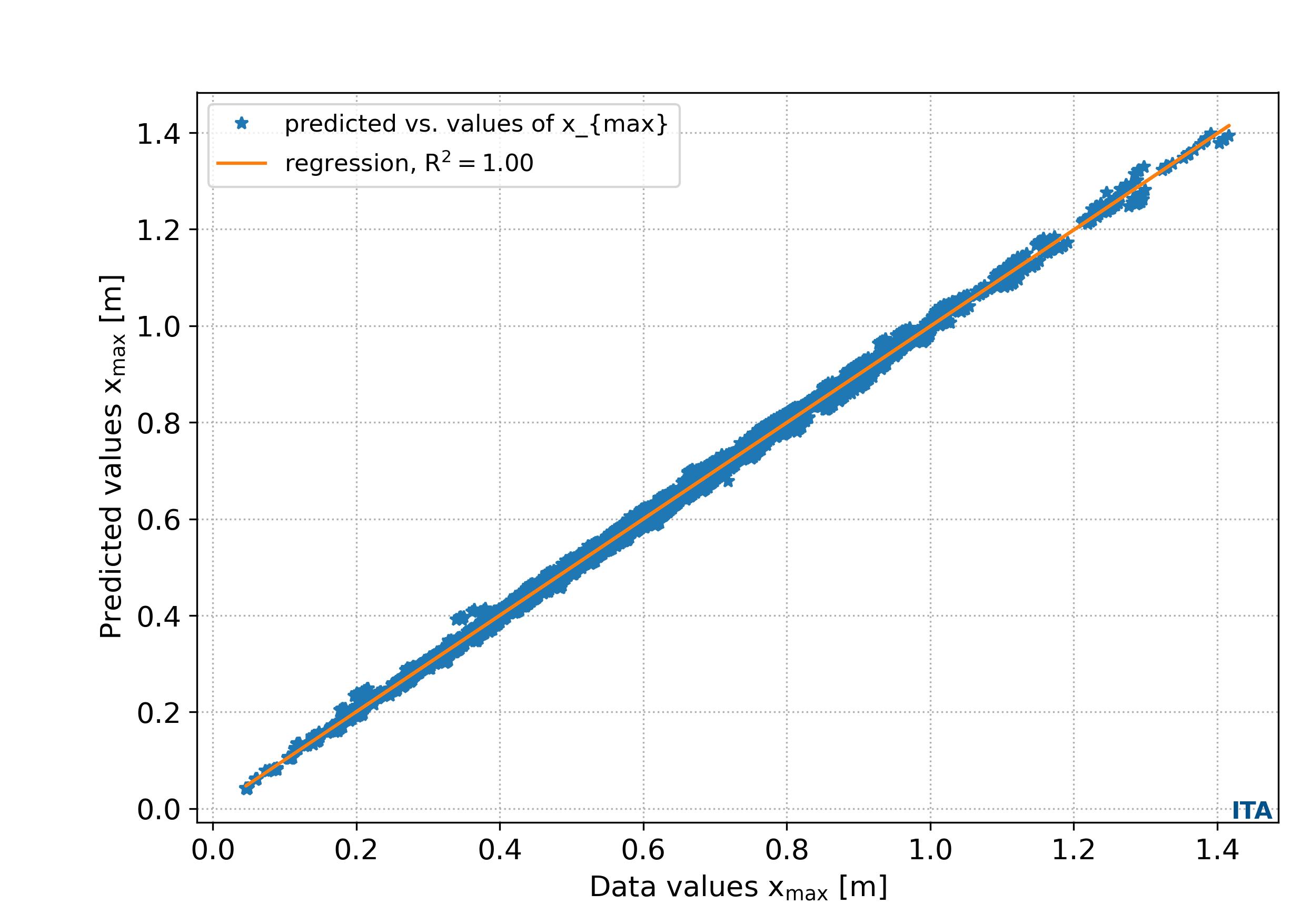
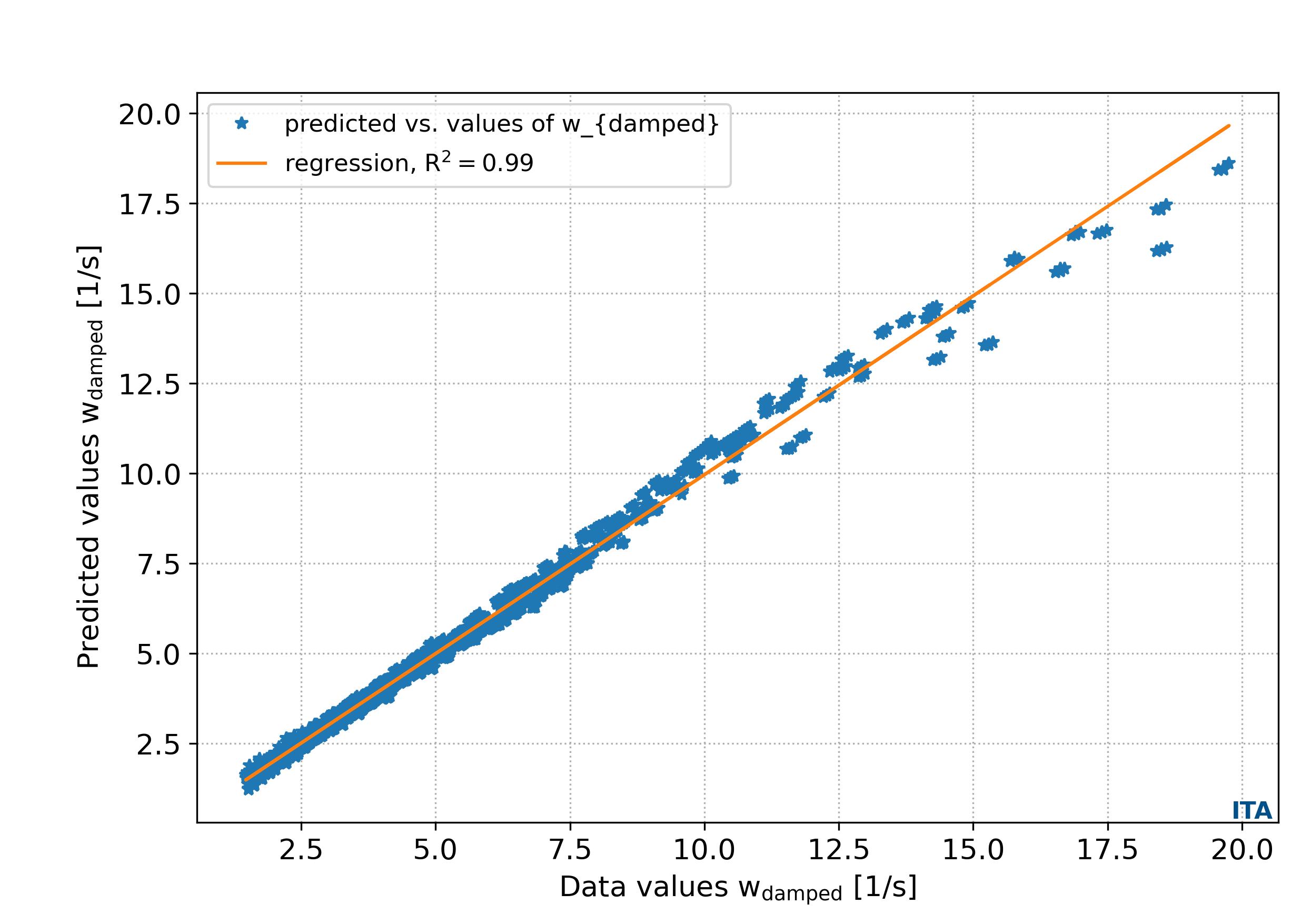
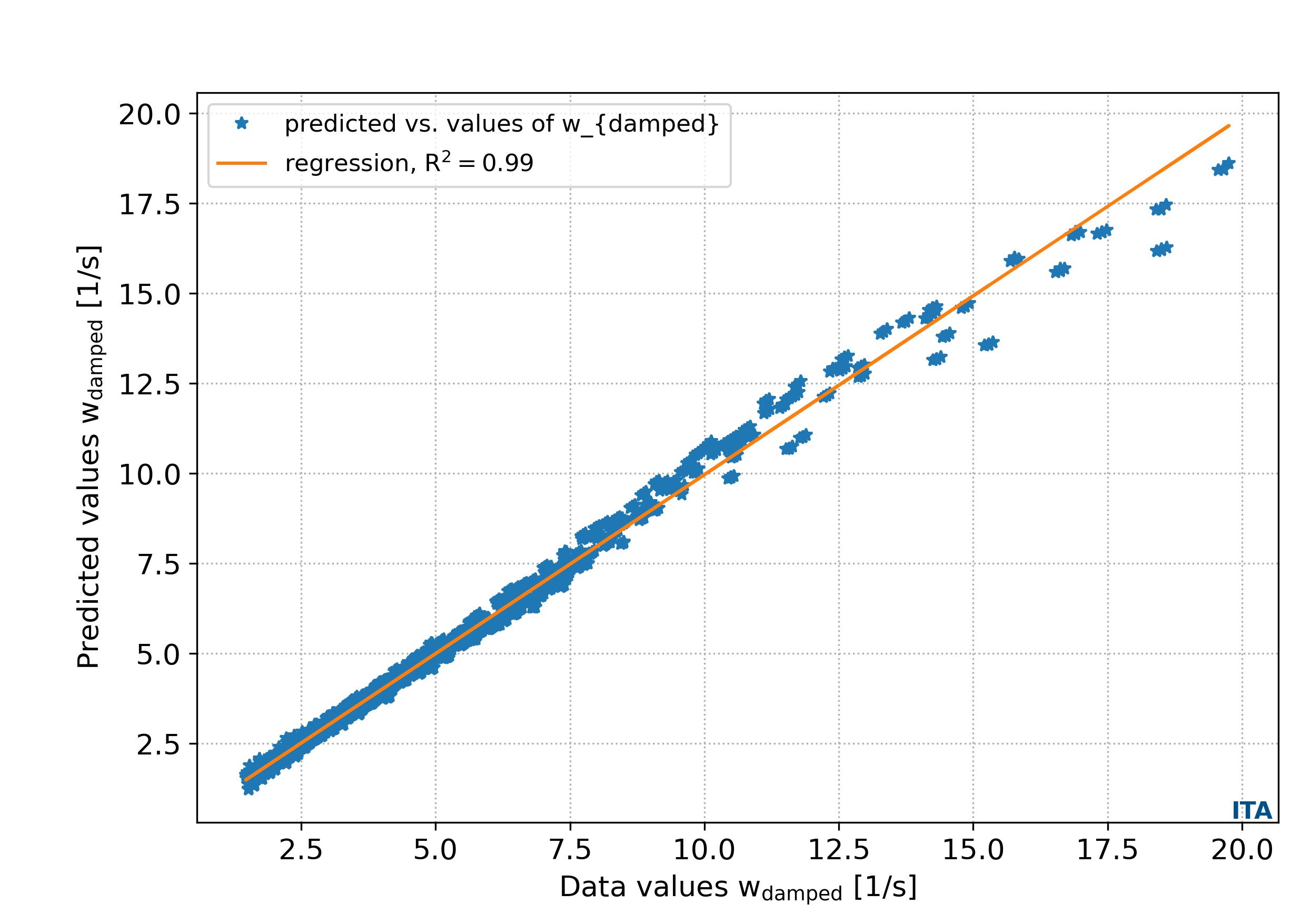
The function output_plts_models_residuals_plot() plots the residual values of the ML metamodel DOEY predictions in comparison with the ground truth DOEY values showing the regression score between the data and the predictions. An example can be seen in Fig. 4.3.3.

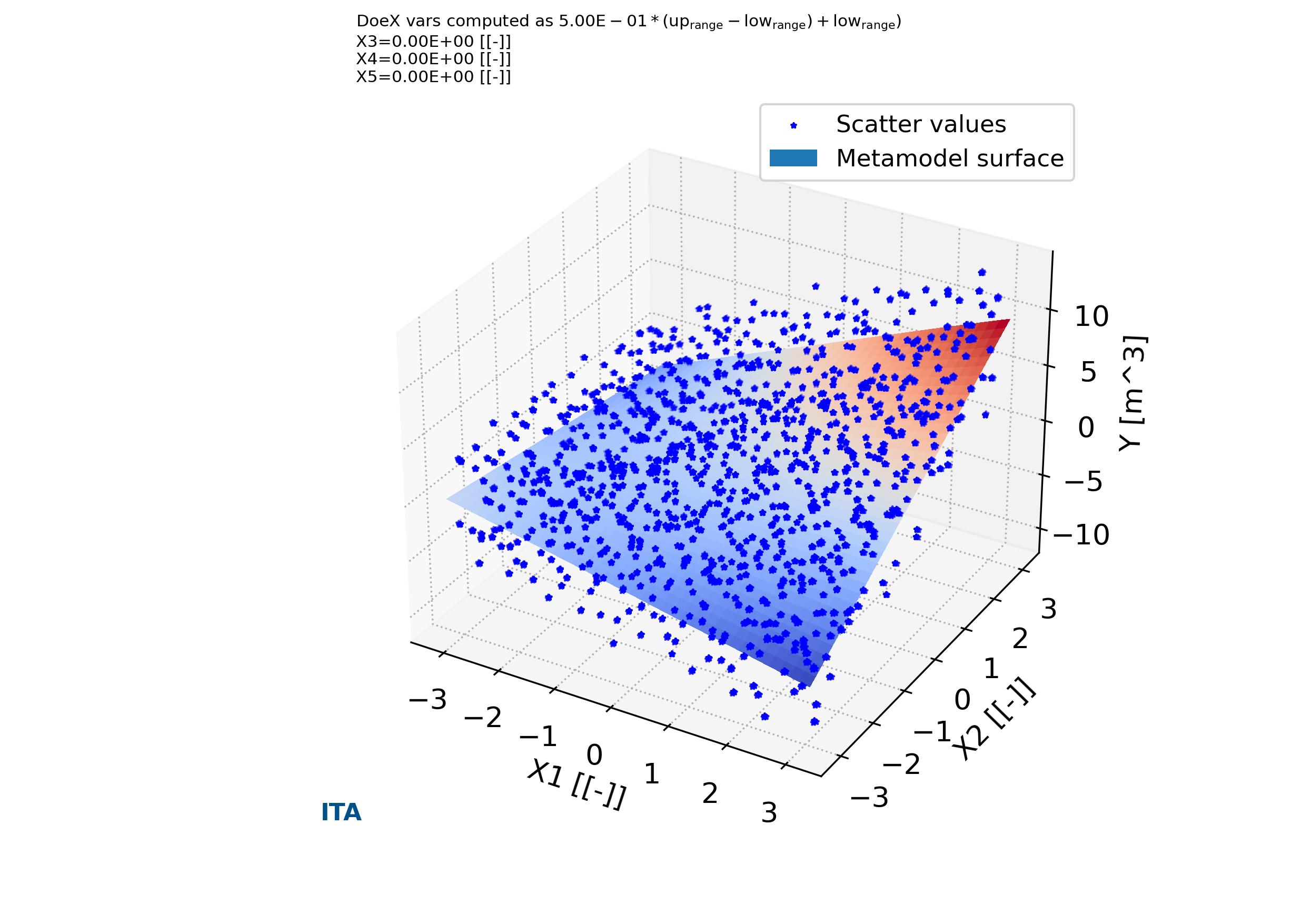
In addition, the function output_plts_models_XYZ() plot all the combinations of XYZ plots showing the prediction surfaces constructed using the ML metamodel. An example can be seen in Fig. 4.3.1 and Fig. 4.3.2.

parse-figure

Fig. 4.3.1 Metamodels surface of variable X1 versus X2 versus Y in case_1. Tutorial A03

parse-figure

Fig. 4.3.2 Metamodels surface of variable X2 versus X3 versus Y in case_1. Tutorial A03

parse-figure

Fig. 4.3.3 Metamodels residual plot Y values versus predictions in case_1. Tutorial A03

4.4. Tutorial case A04: “Sensitivity analysis and metamodeling of Kursawe Functions”

In this tutorial are described the construction of the model, sensitivity analysis and metamodels, as well as the default plotting of them. For this purpose is used the DOE design and sensitivity analysis for a coupled function described in the previous tutorial case as a base line. The Kursawe Functions are define by three variables \(X_1, X_2, X_3\) and two output functions \(f_{kursawe1}, f_{kursawe2}\),

\begin{equation} \begin{cases} f_{kursawe1}(x) = \sum_{i=1}^{2} -10 \cdot e^{-0.2 \cdot \sqrt{X_{i}^{2} + X_{i+1}^{2} }} \\ f_{kursawe2}(x) = \sum_{i=1}^{3} \left|X_i\right|^{0.8} + 5 \cdot sin (X_{i}^3) \\ where;\\ -5 <= X_i <= 5, i=1,...,n \end{cases} \end{equation}

The input and output variable for each of the analysis cases are define in the problem definition spreadsheet file (Download: Problem definition spreadsheet file).

The analysis is performed with pymetamodels based on a basic analysis script as follows in test_analysis.py,

Listing 4.4.1 Kursawe Functions test analysis. Sensitivity analysis
  1#!/usr/bin/env python3
  2
  3## Analytical model,
  4##
  5
  6import os, sys, random
  7import numpy as np
  8import gc
  9
 10import pymetamodels
 11import kursawe_model as model_obj
 12
 13class analysis(object):
 14
 15    """
 16
 17    .. _model_kursawe_model_metamodel:
 18
 19    **Synopsis:**
 20        * Analysis framework with pymetamodels
 21        * Coupled function tutorial
 22
 23    """
 24
 25    def __init__(self):
 26
 27        ## Initial variables
 28        self.name = "kursawe_model"
 29        self.folder_script = os.path.dirname(os.path.realpath(__file__))
 30
 31        self.folder_path_inputs = self.folder_script
 32
 33        self.folder_path_outputs = os.path.join(os.path.join(os.path.join(self.folder_script, os.pardir), "_examples_raw"),self.name + "_out")
 34        if not os.path.exists(self.folder_path_outputs): os.makedirs(self.folder_path_outputs)
 35
 36        self.file_name_inputs = r"configuration_spreadsheet"
 37        self.file_name_outputs = r"outputs"
 38
 39        ## Initialise 
 40        self.mita = pymetamodels.load()
 41        self.mita.logging_start(self.folder_path_outputs)          
 42
 43    def run_model(self):
 44
 45        ## Inputs load
 46        folder_path = self.folder_path_inputs
 47        file_name = self.file_name_inputs
 48        self.mita.read_xls_case(folder_path, file_name, sheet="cases", col_start = 0, row_start = 1, tit_row = 0 )
 49
 50        ## Sampling
 51        for case in self.mita.keys():
 52
 53            ## Run samplimg cases
 54            self.mita.run_sampling_routine(case)
 55
 56            ## Run / Load model
 57            self.model_iteration(case, model_obj)
 58
 59            ## Sensitivity analysis
 60            self.mita.run_sensitivity_analisis(case)
 61
 62            ## Metamodeling construction
 63            #self.mita.run_metamodel_construction(case, scheme = "general")
 64            self.mita.run_metamodel_construction(case, scheme = "general_fast")
 65
 66        ##
 67        self.mita.run_sensitivity_normalization()
 68
 69        ## Ploting and others
 70        for case in self.mita.keys():
 71
 72            ## Plots cross varible relation in the sensitivity analysis
 73            self.mita.output_plts_sensitivity(self.folder_path_outputs, case)
 74
 75            ## Plots showing the model DOEX and DOEY variables relationship 2D XY
 76            self.mita.output_plts_models_XY(self.folder_path_outputs, case)
 77
 78            ## Residual values plots
 79            self.mita.output_plts_models_residuals_plot(self.folder_path_outputs, case)
 80
 81            ## Plots showing the model DOEX and DOEY variables relationship 3D XYZ
 82            self.mita.output_plts_models_XYZ(self.folder_path_outputs, case, scatter = False)
 83
 84        ## Output variables save
 85        folder_path = self.folder_path_outputs
 86        file_name = self.file_name_outputs
 87        out_path = self.mita.output_xls(folder_path, file_name, col_start = 0, tit_row = 0)
 88
 89    def model_iteration(self, case, _model_obj):
 90
 91        ## Model iteration to generate Y doe output values
 92        doeX = self.mita.doeX(case)
 93        doeY = self.mita.doeY(case)
 94        vars_in = self.mita.vars_parameter_matrix(case)
 95        case_dict = self.mita.case[case]
 96        samples = len(doeX[list(doeX.keys())[0]])
 97
 98        for ii in range(0, samples):
 99
100            obj_model = _model_obj.model_obj()
101
102            # initialize dictionaries
103            obj_model.doeX = doeX
104            obj_model.doeY = doeY
105            obj_model.case_dict = case_dict
106            obj_model.ii = ii
107            obj_model.vars_in = vars_in
108
109            # add variables as atributes
110            for key in obj_model.doeX.keys():
111                setattr(obj_model, key, obj_model.doeX[key][obj_model.ii])
112
113            # run the model for ii sample
114            obj_model.run_model()
115
116if __name__ == "__main__":
117
118    analysis = analysis()
119
120    analysis.run_model()
The analysis frameworks iterates the model defined in a secondary file as follows in kursawe_model.py,

Listing 4.4.2 Kursawe Functions model code block. Sensitivity analysis
 1#!/usr/bin/env python3
 2
 3import os, sys, random
 4import numpy as np
 5from math import exp, pow, sqrt, sin
 6
 7class model_obj(object):
 8
 9    """
10
11    .. _model_id_001_kursawe_model:
12
13    **Kursawe functions model**
14
15    :platform: Unix, Windows
16    :synopsis: kursawe model
17    :author: FLC
18
19    :Dependences:
20
21    """
22
23    def __init__(self):
24
25        ## Initial variables
26        self.doeX = None
27        self.doeY = None
28        self.case_dict = None
29        self.ii = None
30
31    def run_model(self):
32
33        # variables
34        X1 = self.doeX["X1"][self.ii]
35        X2 = self.doeX["X2"][self.ii]
36        X3 = self.doeX["X3"][self.ii]
37
38        # calculations
39        kursawe1 = -10 * exp(-0.2*sqrt(X1*X1 + X2*X2) )
40        kursawe1 = kursawe1 - 10 * exp(-0.2*sqrt(X2*X2 + X3*X3) )
41
42        kursawe2 = pow(abs(X1),0.8) + 5*pow(sin(X1),3)
43        kursawe2 = kursawe2 + pow(abs(X2),0.8) + 5*pow(sin(X2),3)
44        kursawe2 = kursawe2 + pow(abs(X3),0.8) + 5*pow(sin(X3),3)
45
46        # outputs
47        self.doeY["kursawe1"][self.ii] = kursawe1
48        self.doeY["kursawe2"][self.ii] = kursawe2
49
50        pass

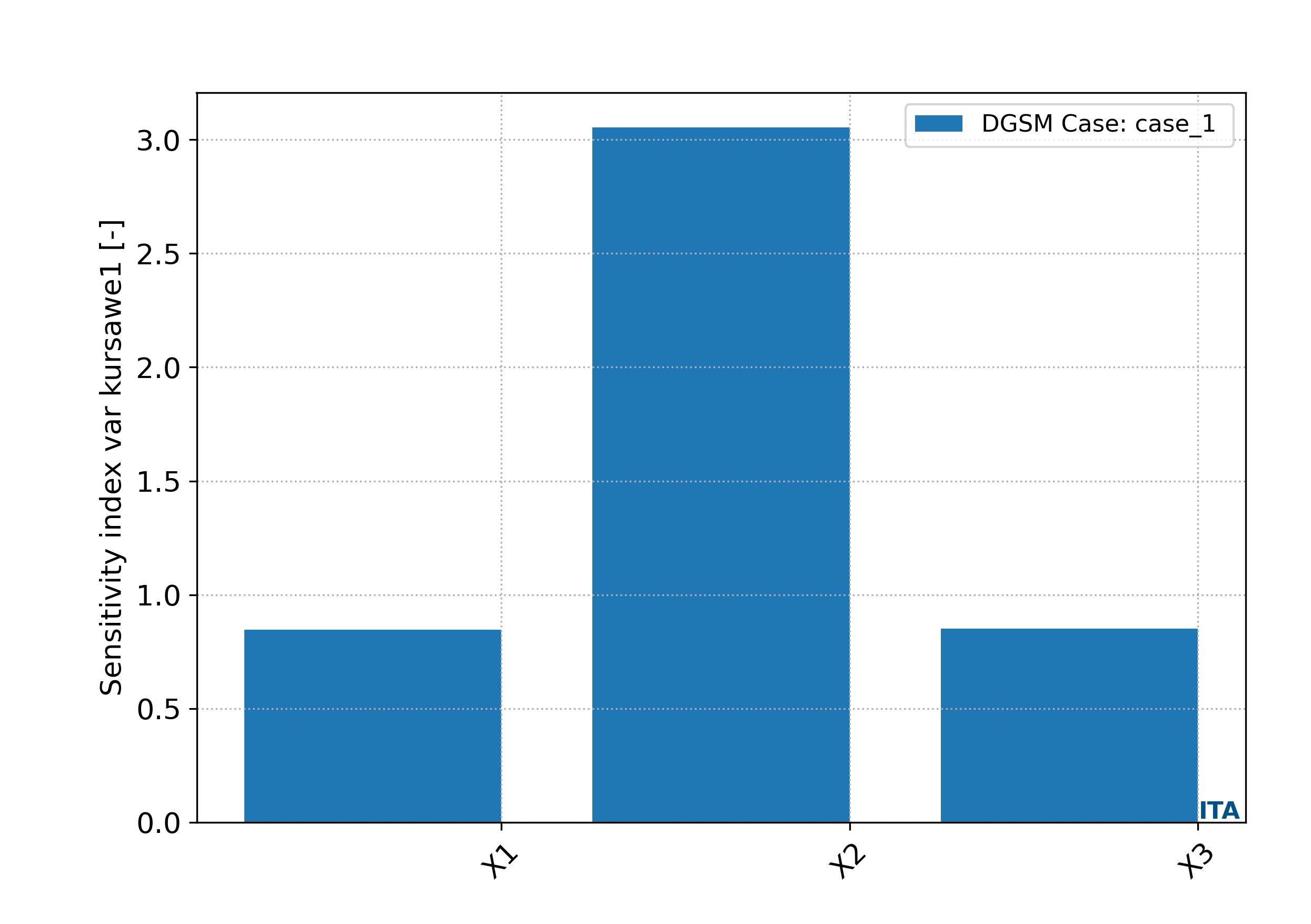
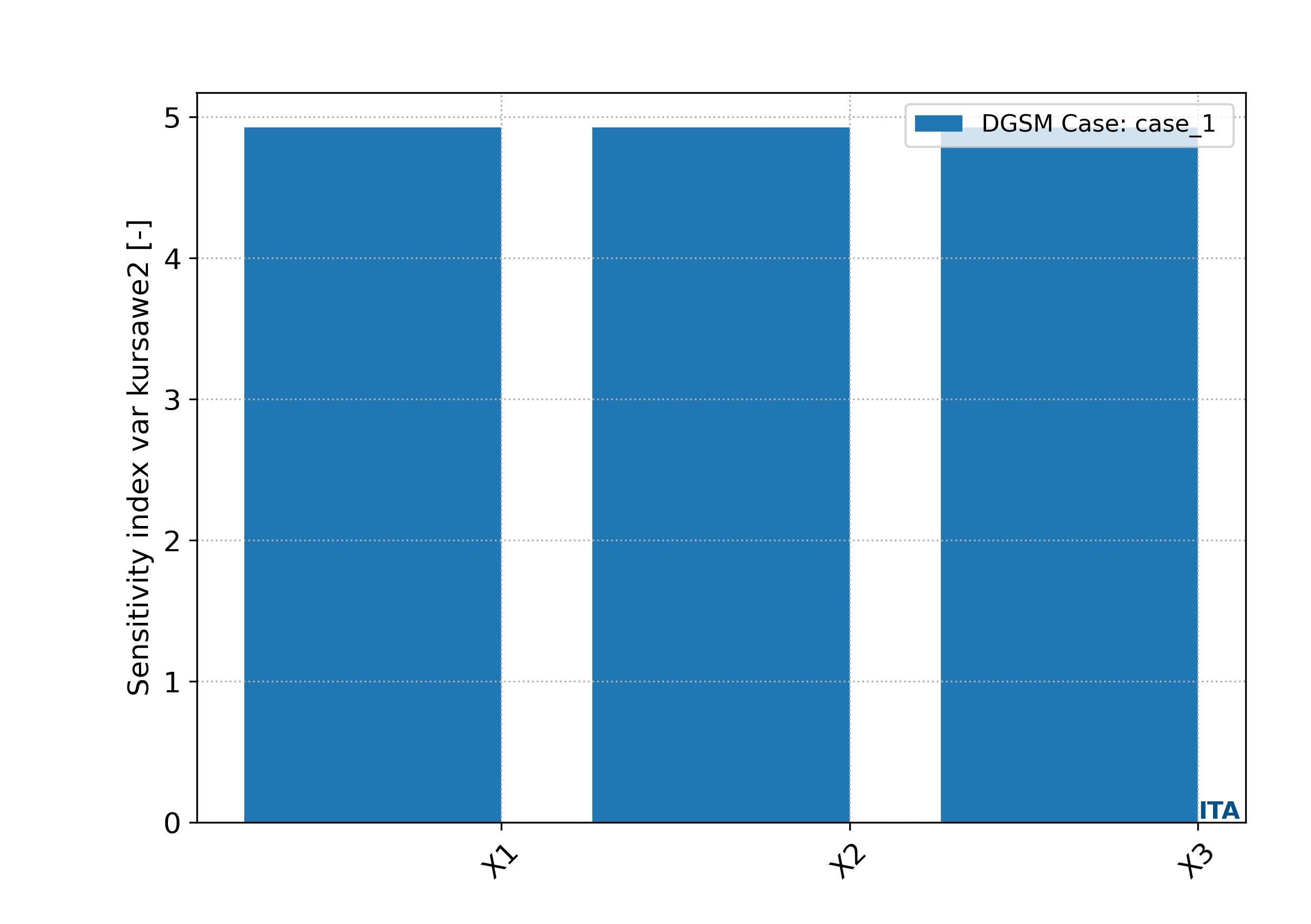
The function output_plts_sensitivity() generates several plots showing the DOEX variables correlation and a summary of the sensitivity analysis. For example this can be seen in Fig. 4.4.1 and Fig. 4.4.2. These plots are located in the output folder.

parse-figure

Fig. 4.4.1 Sensitivity bar plot for case_1, Kursawe function 1. Tutorial A04

parse-figure

Fig. 4.4.2 Sensitivity bar plot for case_1, Kursawe function 2. Tutorial A04

The function run_metamodel_construction() is included in the code to execute the routines related with the metamodeling construction of the DOEY as function of the DOEX data. This functions allows to choose different metamodeling schemas. This schemas perform a robust metamodeling search and find to determine the most adequate metamodeling ML model. Once the ML metamodel is determined allows to predict any data in the ranges of the DOEX and DOEY training values.

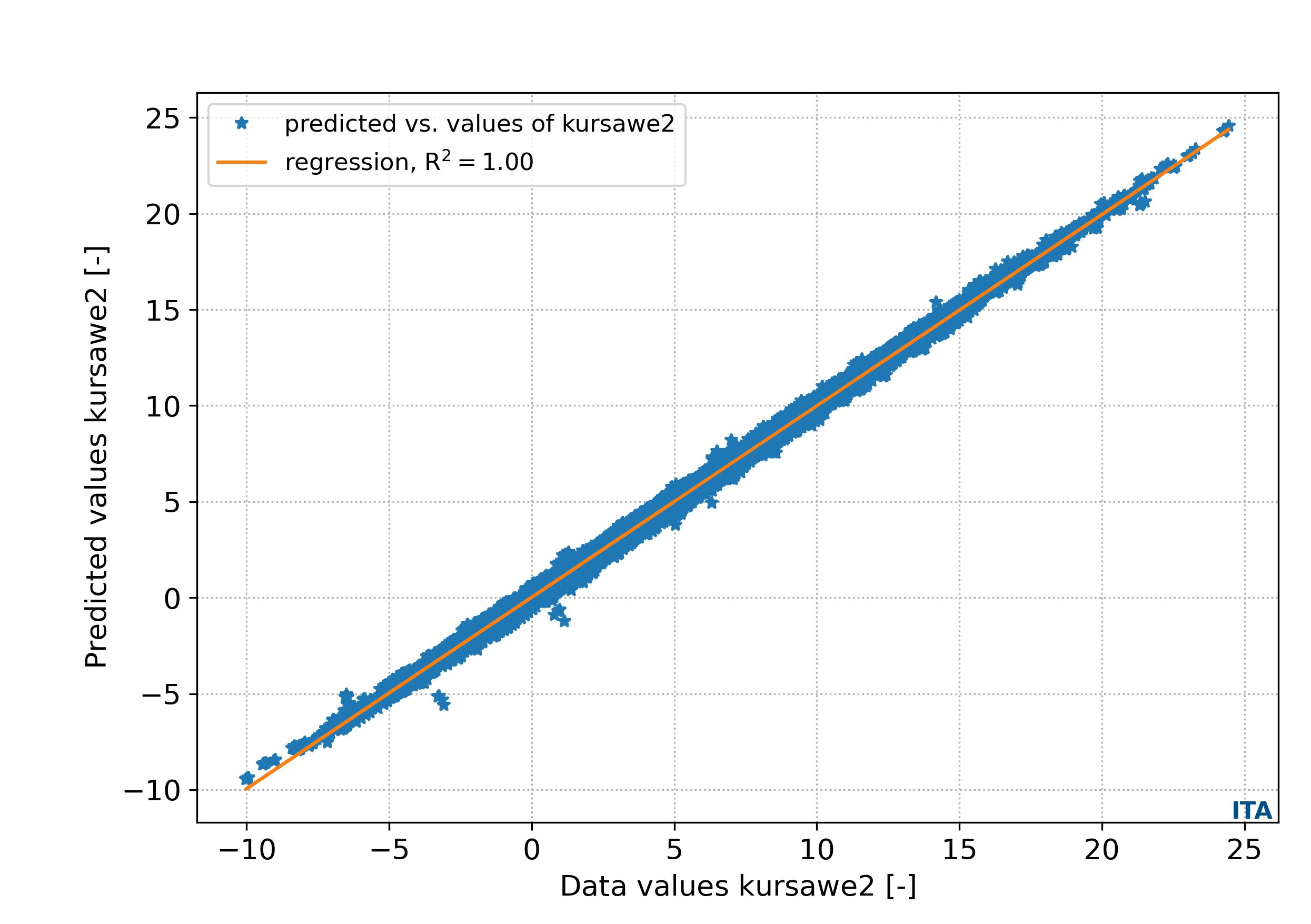
The function output_plts_models_residuals_plot() plots the residual values of the ML metamodel DOEY predictions in comparison with the ground truth DOEY values showing the regression score between the data and the predictions. An example can be seen in Fig. 4.4.7 and Fig. 4.4.8.

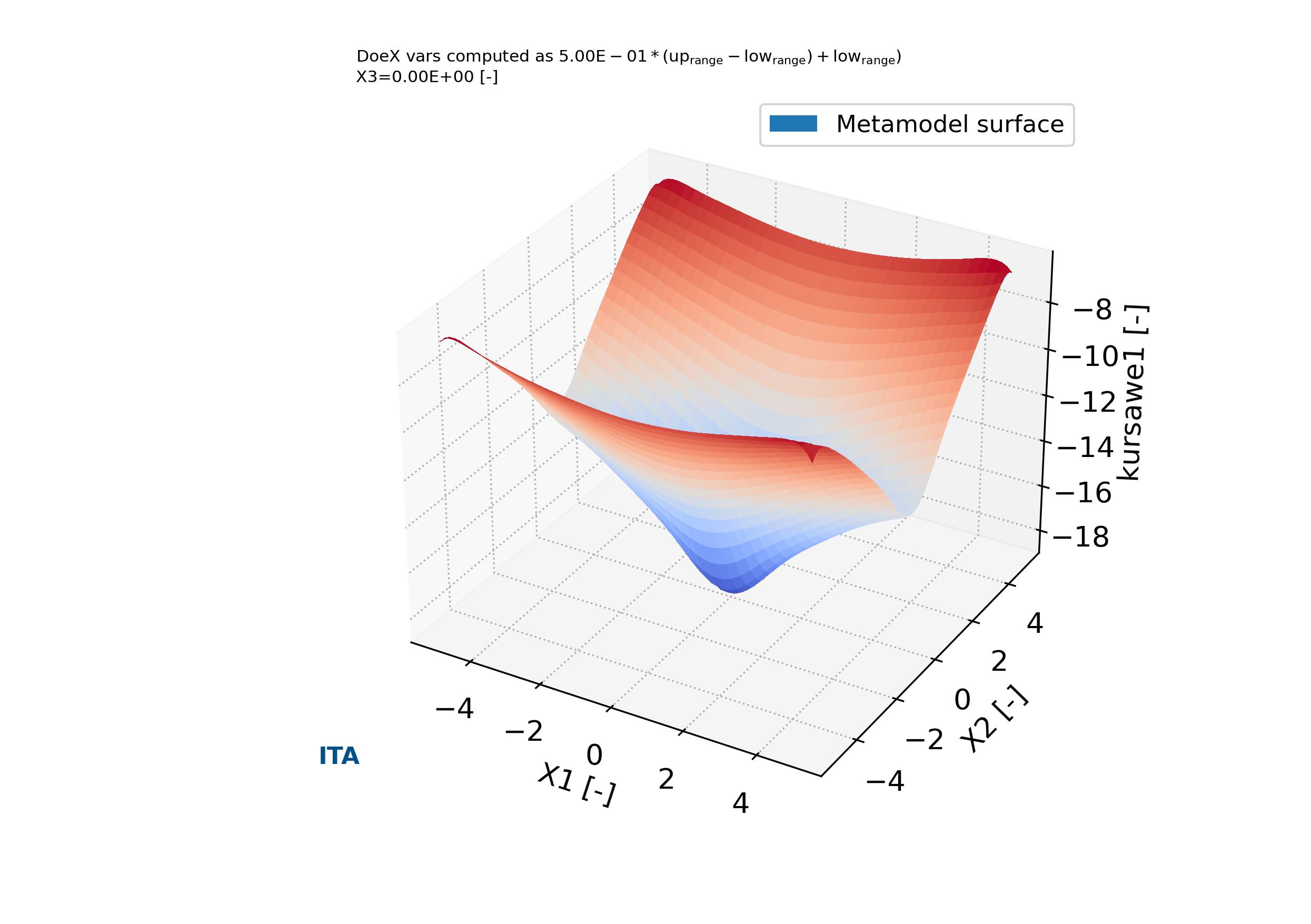
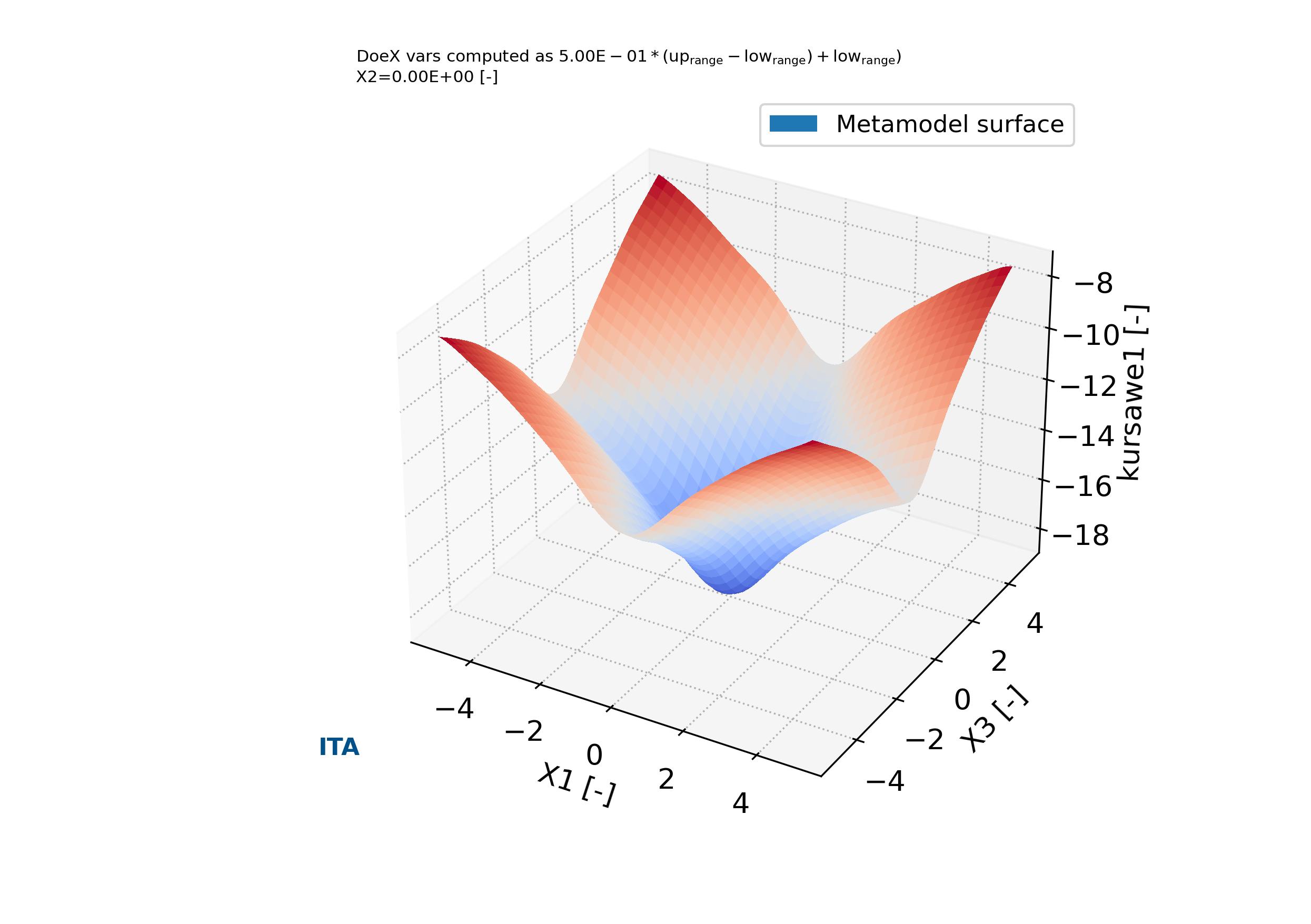
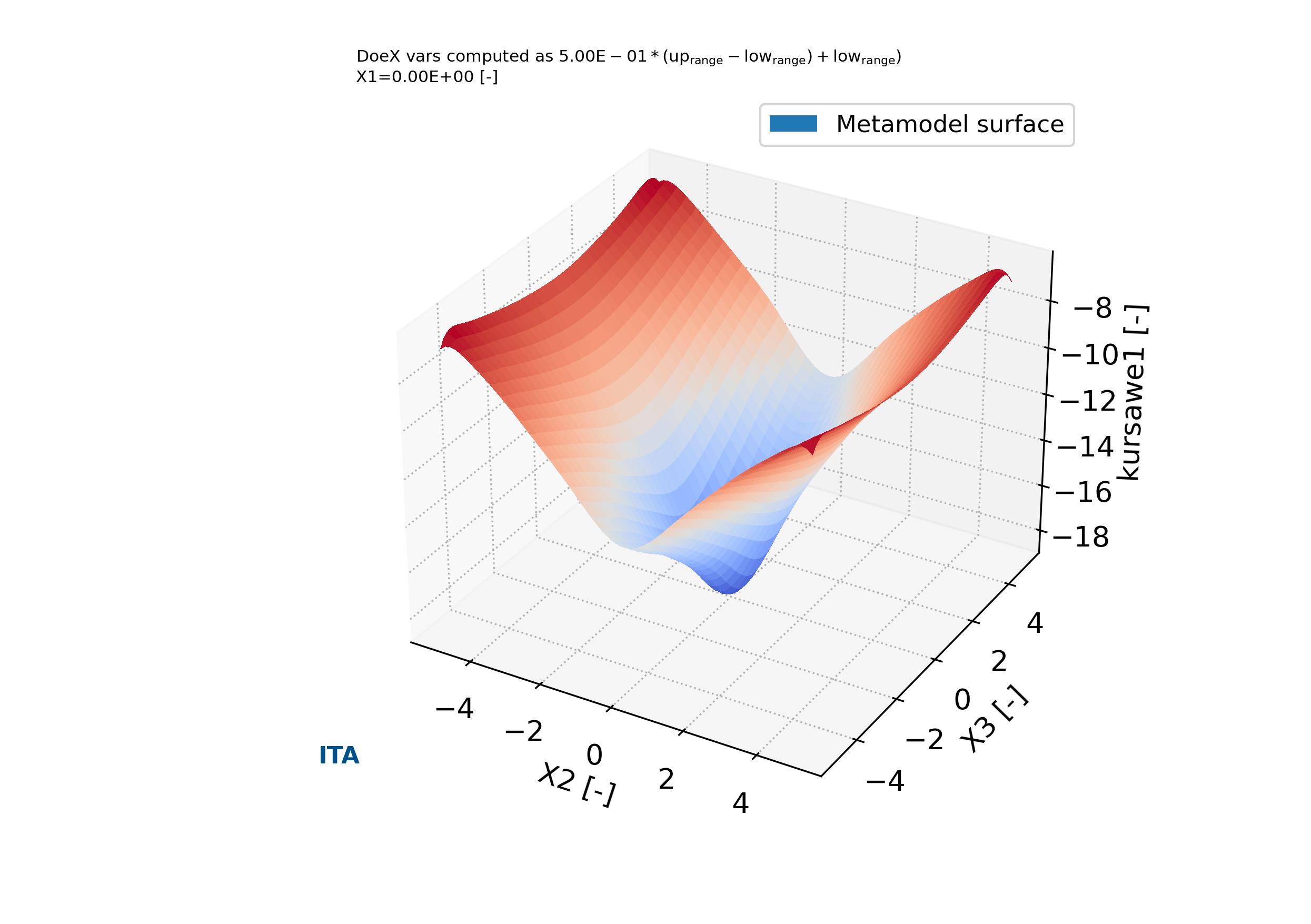
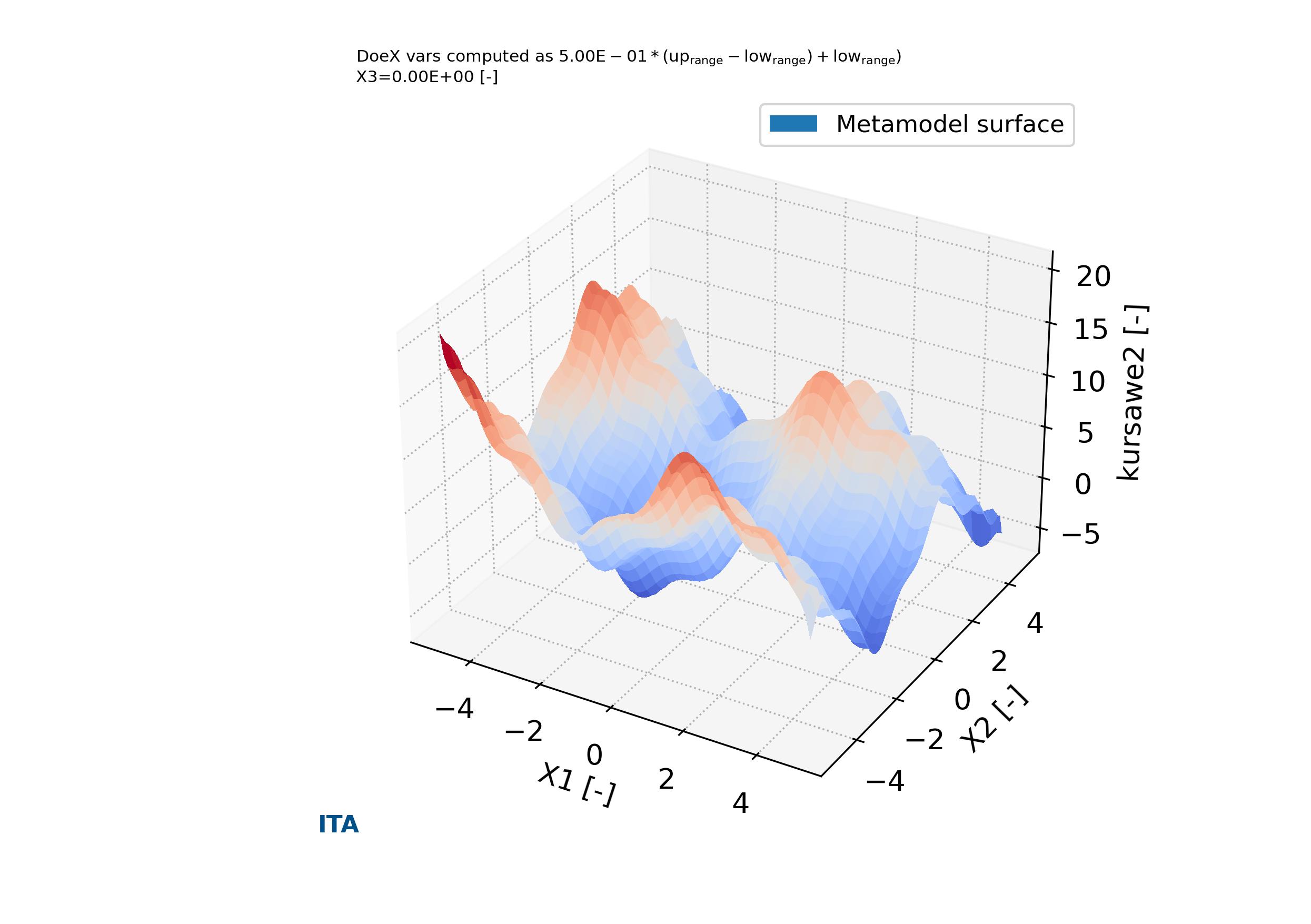
In addition, the function output_plts_models_XYZ() plot all the combinations of XYZ plots showing the prediction surfaces constructed using the ML metamodel. An example can be seen in Fig. 4.4.3, Fig. 4.4.4, Fig. 4.4.5, Fig. 4.4.6 and Fig. 4.3.2.

parse-figure

Fig. 4.4.3 Metamodels surface of variable X1 versus X2 versus kursawe1 in case_1. Tutorial A04

parse-figure

Fig. 4.4.4 Metamodels surface of variable X1 versus X3 versus kursawe1 in case_1. Tutorial A04

parse-figure

Fig. 4.4.5 Metamodels surface of variable X2 versus X3 versus kursawe1 in case_1. Tutorial A04

parse-figure

Fig. 4.4.6 Metamodels surface of variable X1 versus X2 versus kursawe2 in case_1. Tutorial A04

parse-figure

Fig. 4.4.7 Metamodels residual plot Kursawe function 1 values versus predictions in case_1. Tutorial A04

parse-figure

Fig. 4.4.8 Metamodels residual plot Kursawe function 2 values versus predictions in case_1. Tutorial A04

4.5. Tutorial case A05: “Sensitivity analysis and metamodeling of a damped oscillator”

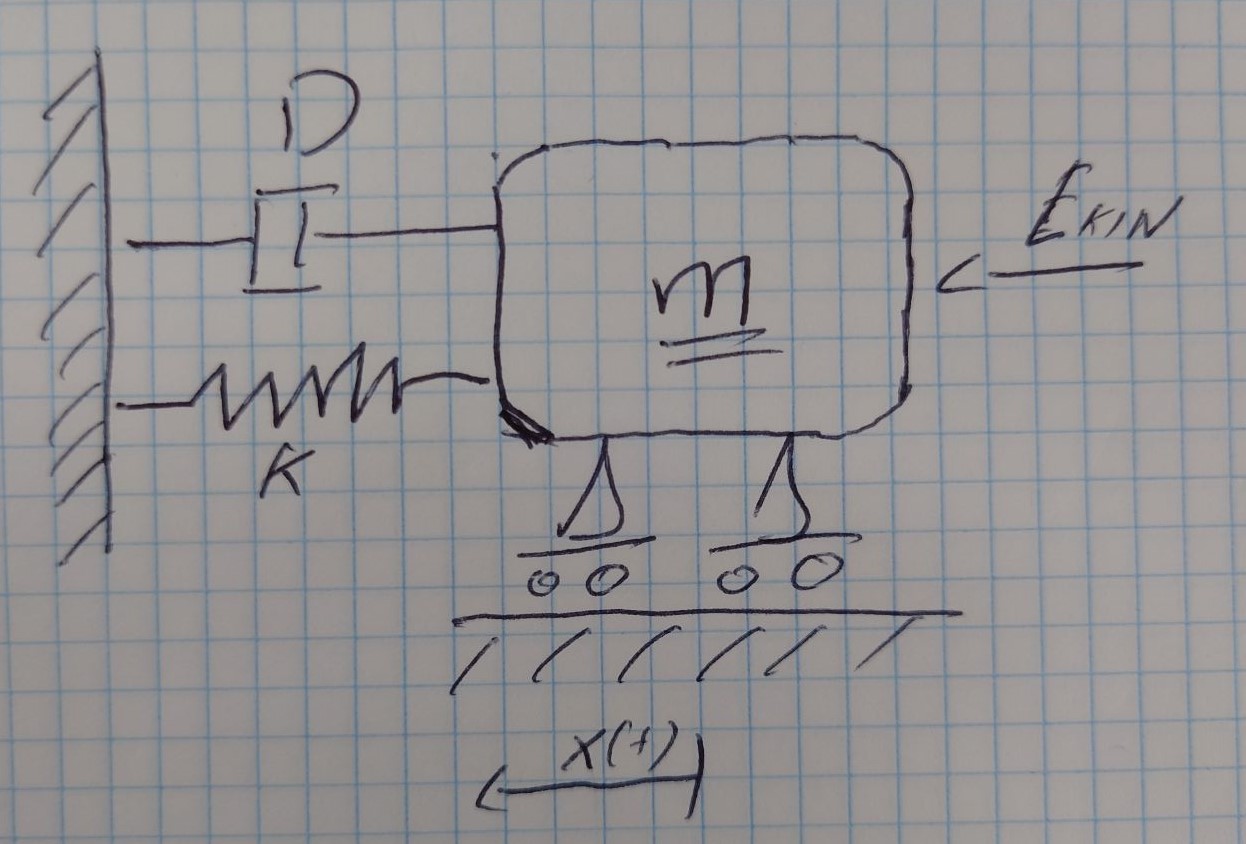
In this tutorial are described the construction of the model, sensitivity analysis and metamodels, as well as the default plotting of them. For this purpose is used the DOE design and sensitivity analysis for a coupled function described in the previous tutorial case as a base line. The damped oscillator is define by a mass paramter \(m\), a spring constant \(k\) and a damping factor \(D\) (see Fig. 4.5.1) drive by a kinetical energy \(E_{kin}\). The damped oscillator is driven by the following equations,

\begin{equation} \begin{cases} \ddot{x} + 2 \cdot D \cdot w_0 \cdot \dot{x} + w_0^2 \cdot x = 0 \quad \quad Differential \ equation \ of \ movement \\ E_{kin} = \frac{m \cdot v^2_0}{2}, \quad x_0=0 \quad \quad Initial \ conditions \\ x(t) = e^{-D \cdot w_0 \cdot t} \cdot \frac{v_0}{w} \cdot sin(w \cdot t) \quad \quad Solution \ eq. \ x(t) \ dependant \ on \ the \ time \\ w_0 = \sqrt{k/m} \quad w = w_0 \sqrt{1-D^2} \quad \quad Natural \ frequency, \ damped \ and \ non-damped \end{cases} \end{equation}
parse-figure

Fig. 4.5.1 Damped oscillator diagram. Tutorial A05

The input and output variable for each of the analysis cases are define in the problem definition spreadsheet file (Download: Problem definition spreadsheet file).

The analysis is performed with pymetamodels based on a basic analysis script as follows in test_analysis.py,

Listing 4.5.1 Damped oscillator test analysis. Sensitivity analysis
  1#!/usr/bin/env python3
  2
  3## Analytical model,
  4##
  5
  6import os, sys, random
  7import numpy as np
  8import gc
  9
 10import pymetamodels
 11import damped_model as model_obj
 12
 13class analysis(object):
 14
 15    """
 16
 17    .. _model_damped_oscillator_metamodel:
 18
 19    **Synopsis:**
 20        * Analysis framework with pymetamodels
 21        * Damped oscillator tutorial
 22
 23    """
 24
 25    def __init__(self):
 26        
 27        ## Initial variables
 28        self.name = "damped_oscillator"
 29        self.folder_script = os.path.dirname(os.path.realpath(__file__))
 30
 31        self.folder_path_inputs = self.folder_script
 32
 33        self.folder_path_outputs = os.path.join(os.path.join(os.path.join(self.folder_script, os.pardir), "_examples_raw"),self.name + "_out")
 34        if not os.path.exists(self.folder_path_outputs): os.makedirs(self.folder_path_outputs)
 35
 36        self.file_name_inputs = r"configuration_spreadsheet"
 37        self.file_name_outputs = r"outputs"
 38
 39        ## Initialise 
 40        self.mita = pymetamodels.load()
 41        self.mita.logging_start(self.folder_path_outputs)          
 42
 43    def run_model(self):
 44
 45        ## Inputs load
 46        folder_path = self.folder_path_inputs
 47        file_name = self.file_name_inputs
 48        self.mita.read_xls_case(folder_path, file_name, sheet="cases", col_start = 0, row_start = 1, tit_row = 0 )
 49
 50        ## Sampling
 51        for case in self.mita.keys():
 52
 53            ## Run samplimg cases
 54            self.mita.run_sampling_routine(case)
 55
 56            ## Run / Load model
 57            self.model_iteration(case, model_obj)
 58
 59            ## Sensitivity analysis
 60            self.mita.run_sensitivity_analisis(case)
 61
 62            ## Metamodeling construction
 63            #self.mita.run_metamodel_construction(case, scheme = "general")
 64            self.mita.run_metamodel_construction(case, scheme = "general_fast")
 65
 66        ##
 67        self.mita.run_sensitivity_normalization()
 68
 69        ## Ploting and others
 70        for case in self.mita.keys():
 71
 72            ## Plots cross varible relation in the sensitivity analysis
 73            self.mita.output_plts_sensitivity(self.folder_path_outputs, case)
 74
 75            ## Plots showing the model DOEX and DOEY variables relationship 2D XY
 76            self.mita.output_plts_models_XY(self.folder_path_outputs, case)
 77
 78            ## Residual values plots
 79            self.mita.output_plts_models_residuals_plot(self.folder_path_outputs, case)
 80
 81            ## Plots showing the model DOEX and DOEY variables relationship 3D XYZ
 82            self.mita.output_plts_models_XYZ(self.folder_path_outputs, case, scatter = False)
 83
 84        ## Output variables save
 85        folder_path = self.folder_path_outputs
 86        file_name = self.file_name_outputs
 87        out_path = self.mita.output_xls(folder_path, file_name, col_start = 0, tit_row = 0)
 88
 89    def model_iteration(self, case, _model_obj):
 90
 91        ## Model iteration to generate Y doe output values
 92        doeX = self.mita.doeX(case)
 93        doeY = self.mita.doeY(case)
 94        vars_in = self.mita.vars_parameter_matrix(case)
 95        case_dict = self.mita.case[case]
 96        samples = len(doeX[list(doeX.keys())[0]])
 97
 98        for ii in range(0, samples):
 99
100            obj_model = _model_obj.model_obj()
101
102            # initialize dictionaries
103            obj_model.doeX = doeX
104            obj_model.doeY = doeY
105            obj_model.case_dict = case_dict
106            obj_model.ii = ii
107            obj_model.vars_in = vars_in
108
109            # add variables as atributes
110            for key in obj_model.doeX.keys():
111                setattr(obj_model, key, obj_model.doeX[key][obj_model.ii])
112
113            # run the model for ii sample
114            obj_model.run_model()
115
116if __name__ == "__main__":
117
118    analysis = analysis()
119
120    analysis.run_model()
The analysis frameworks iterates the model defined in a secondary file as follows in damped_oscillator.py,

Listing 4.5.2 Damped oscillator model code block. Sensitivity analysis
 1#!/usr/bin/env python3
 2
 3## damped oscillator
 4##
 5
 6import os, sys, random
 7import numpy as np
 8from math import exp, pow, sqrt, sin
 9
10class model_obj(object):
11
12    """
13
14    .. _model_id_001_damped_oscillator:
15
16    **Damped oscillator functions model**
17
18    :platform: Unix, Windows
19    :synopsis: Damped oscillator
20    :author:
21
22    :Dependences:
23
24    """
25
26    def __init__(self):
27
28        ## Initial variables
29        self.doeX = None
30        self.doeY = None
31        self.case_dict = None
32        self.ii = None
33
34    def run_model(self):
35
36        # variables
37        m = self.doeX["m"][self.ii] #kg [0.1,5.0]
38        k = self.doeX["k"][self.ii] # N/m [20,50]
39
40        D = self.doeX["D"][self.ii]
41        Ekin = self.doeX["E_{kin}"][self.ii] #10 [Nm]
42
43        # calculations
44        omega_0 = (k/m)**0.5 #w_0
45        omega = omega_0 * (1-(D**2.))**0.5 #w
46        v_0 = ((2*Ekin)/m)**0.5
47
48        num_steps = 101
49        t_max =  10
50        t_observe = 5 # x(t>5) -> min
51
52        # time serie
53        t_serie = []
54        for ii in range(0,num_steps):
55            t_serie.append(t_observe+ii*float(t_max-t_observe)/num_steps)
56
57        # ------------------------- #
58        #   Results
59        # ------------------------- #
60        # time serie values
61        x_serie = []
62        for ii in range(0,num_steps):
63            tt_serie = t_serie[ii]
64            xx_serie = exp(-1*D*omega_0*tt_serie)*(v_0/omega)*sin(omega*tt_serie)
65            x_serie.append(xx_serie)
66
67        # find max value
68        ref = None
69        for ii in range(0,num_steps):
70            if ref is None: ref = abs(x_serie[ii])
71            if abs(x_serie[ii]) >= ref: ref = abs(x_serie[ii])
72
73        x_max = ref
74
75        w_damped = omega_0 * (1-(D**2.))**0.5
76
77        # outputs
78        self.doeY["x_{max}"][self.ii] = x_max
79        self.doeY["w_{damped}"][self.ii] = w_damped

The function output_plts_sensitivity() generates several plots showing the DOEX variables correlation and a summary of the sensitivity analysis. For example this can be seen in Fig. 4.5.2 and Fig. 4.5.3. These plots are located in the output folder.

parse-figure

Fig. 4.5.2 Sensitivity bar plot for case_2, :math:` x_{max}`. Tutorial A05

parse-figure

Fig. 4.5.3 Sensitivity bar plot for case_1, \(w_{damped}\). Tutorial A05

The function run_metamodel_construction() is included in the code to execute the routines related with the metamodeling construction of the DOEY as function of the DOEX data. This functions allows to choose different metamodeling schemas. This schemas perform a robust metamodeling search and find to determine the most adequate metamodeling ML model. Once the ML metamodel is determined allows to predict any data in the ranges of the DOEX and DOEY training values.

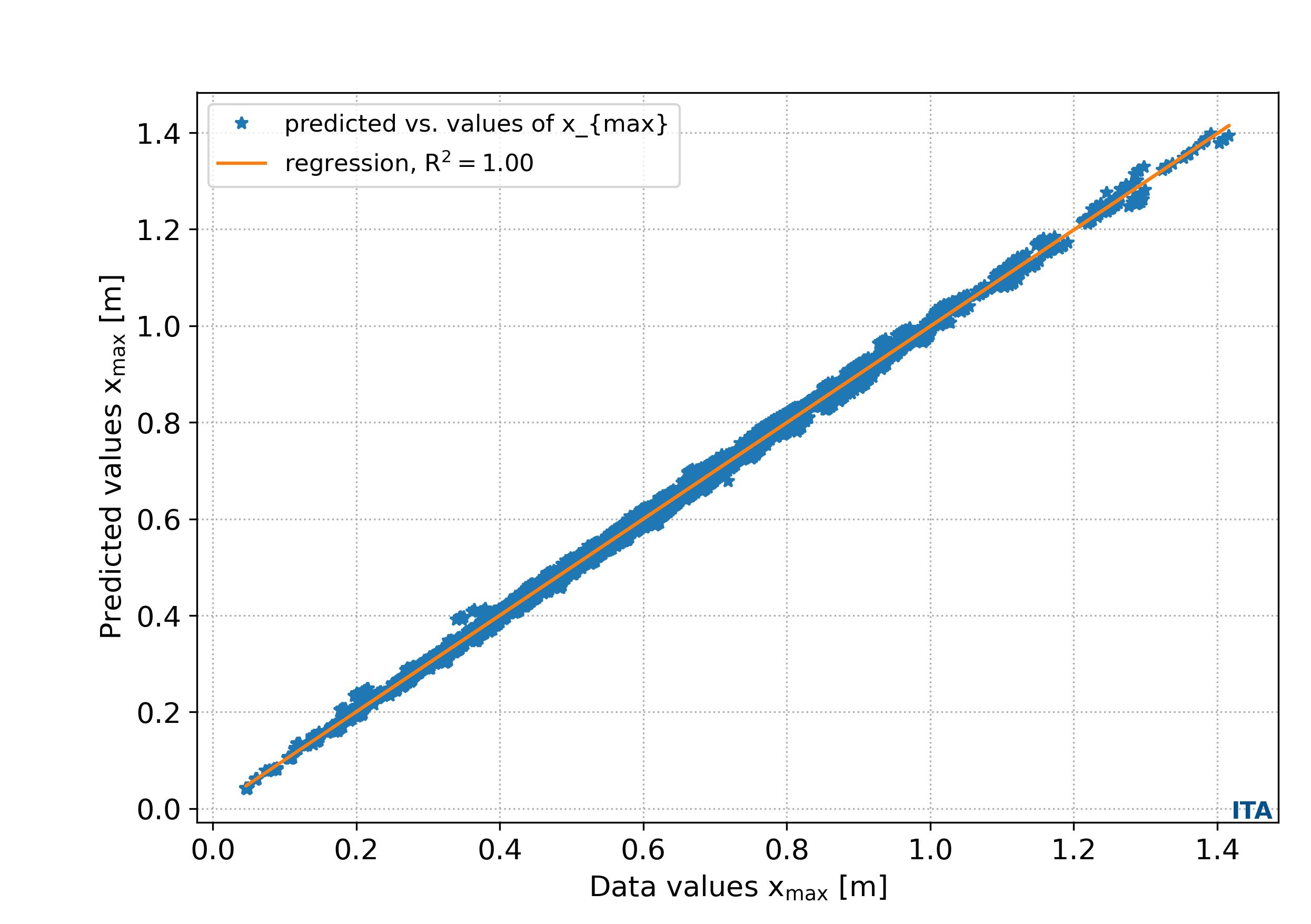
The function output_plts_models_residuals_plot() plots the residual values of the ML metamodel DOEY predictions in comparison with the ground truth DOEY values showing the regression score between the data and the predictions. An example can be seen in Fig. 4.4.7 and Fig. 4.4.8.

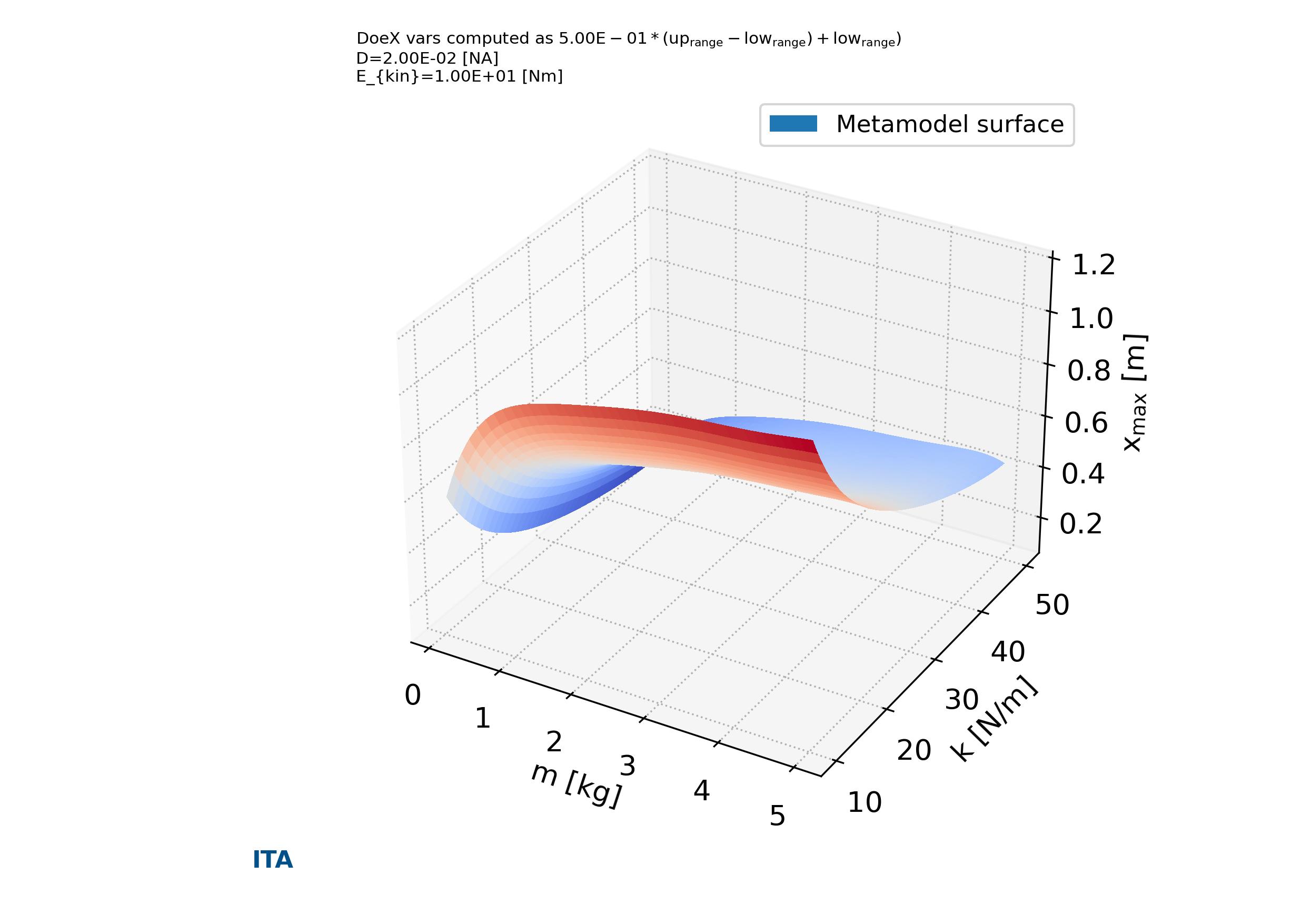
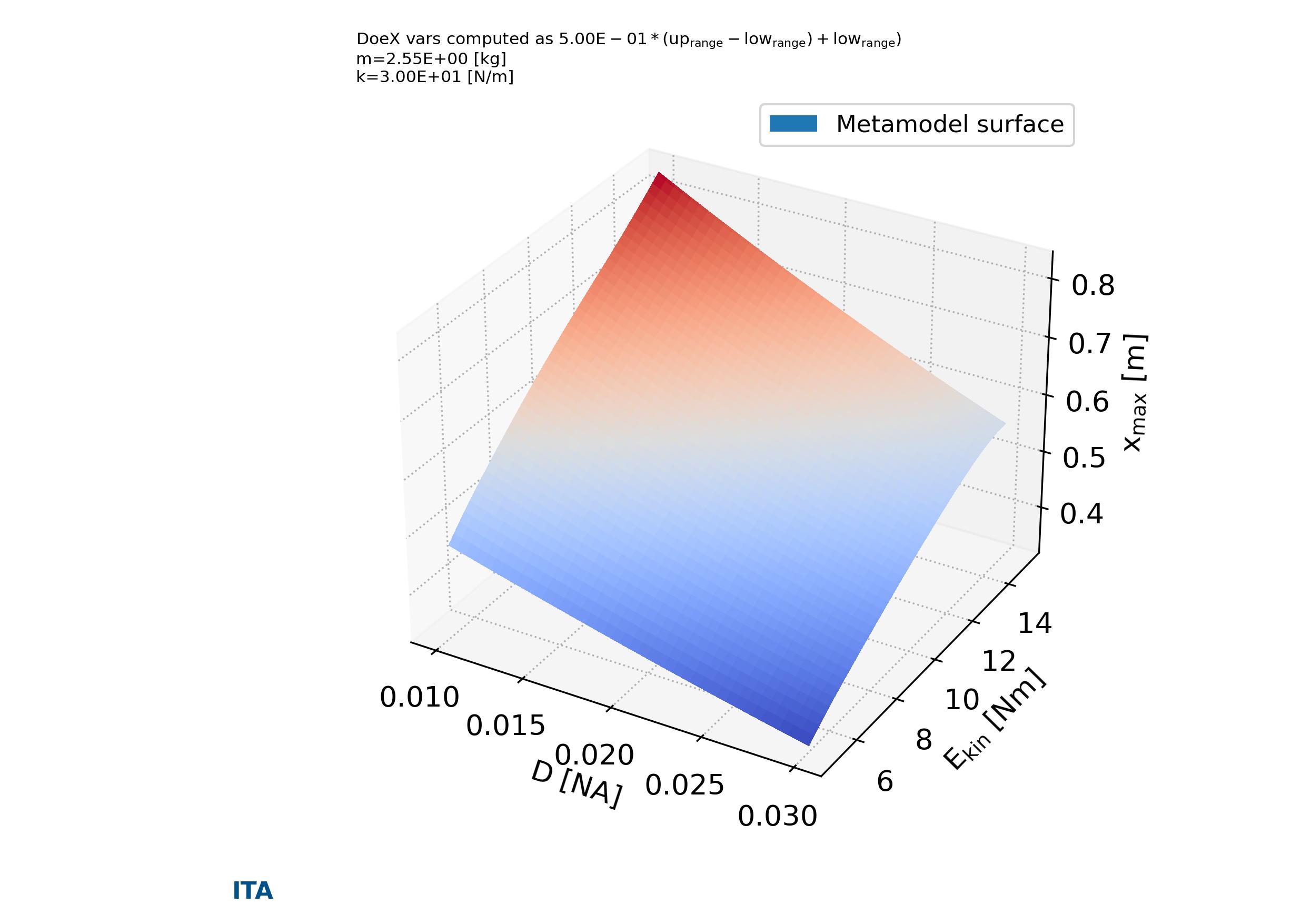
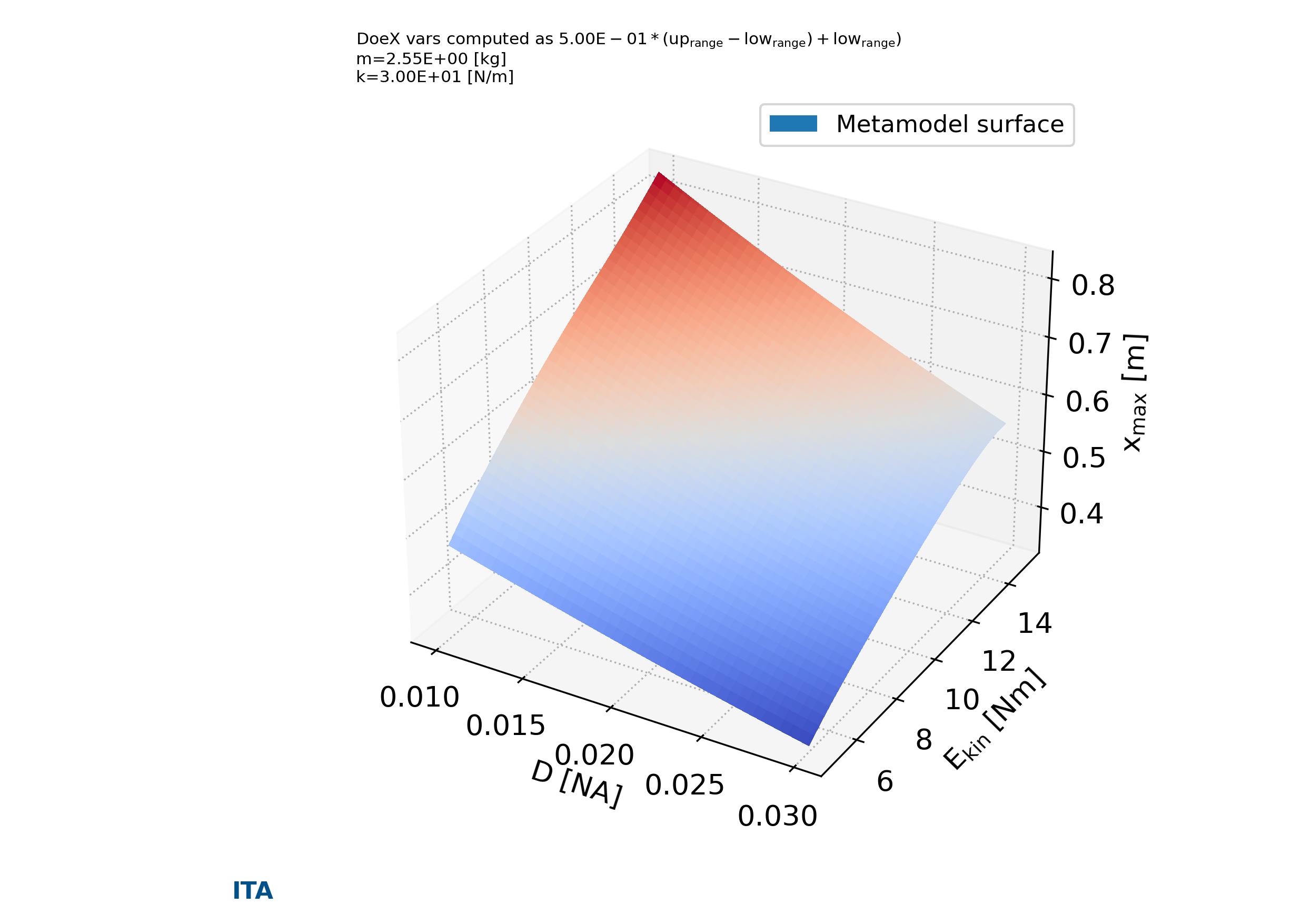
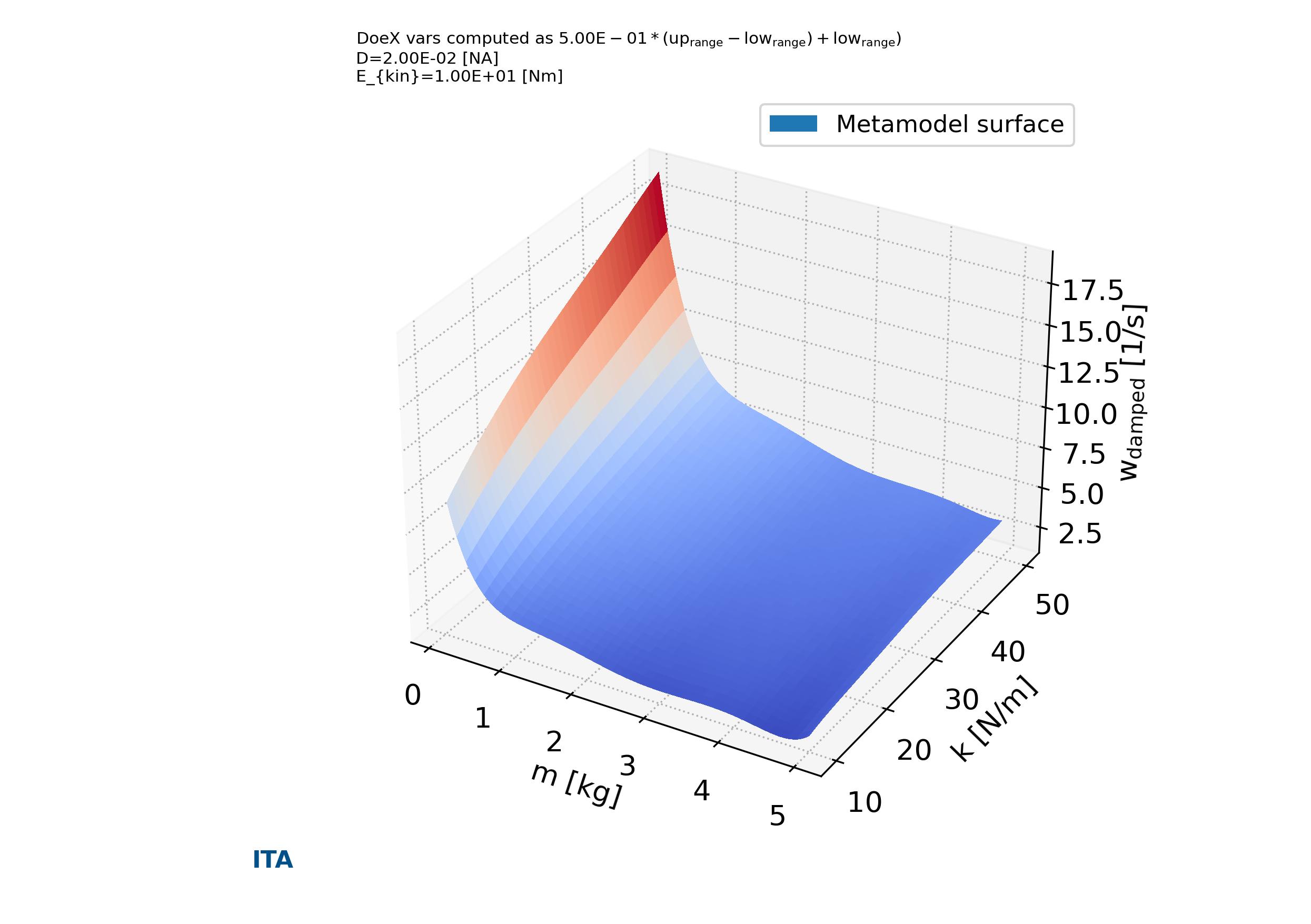
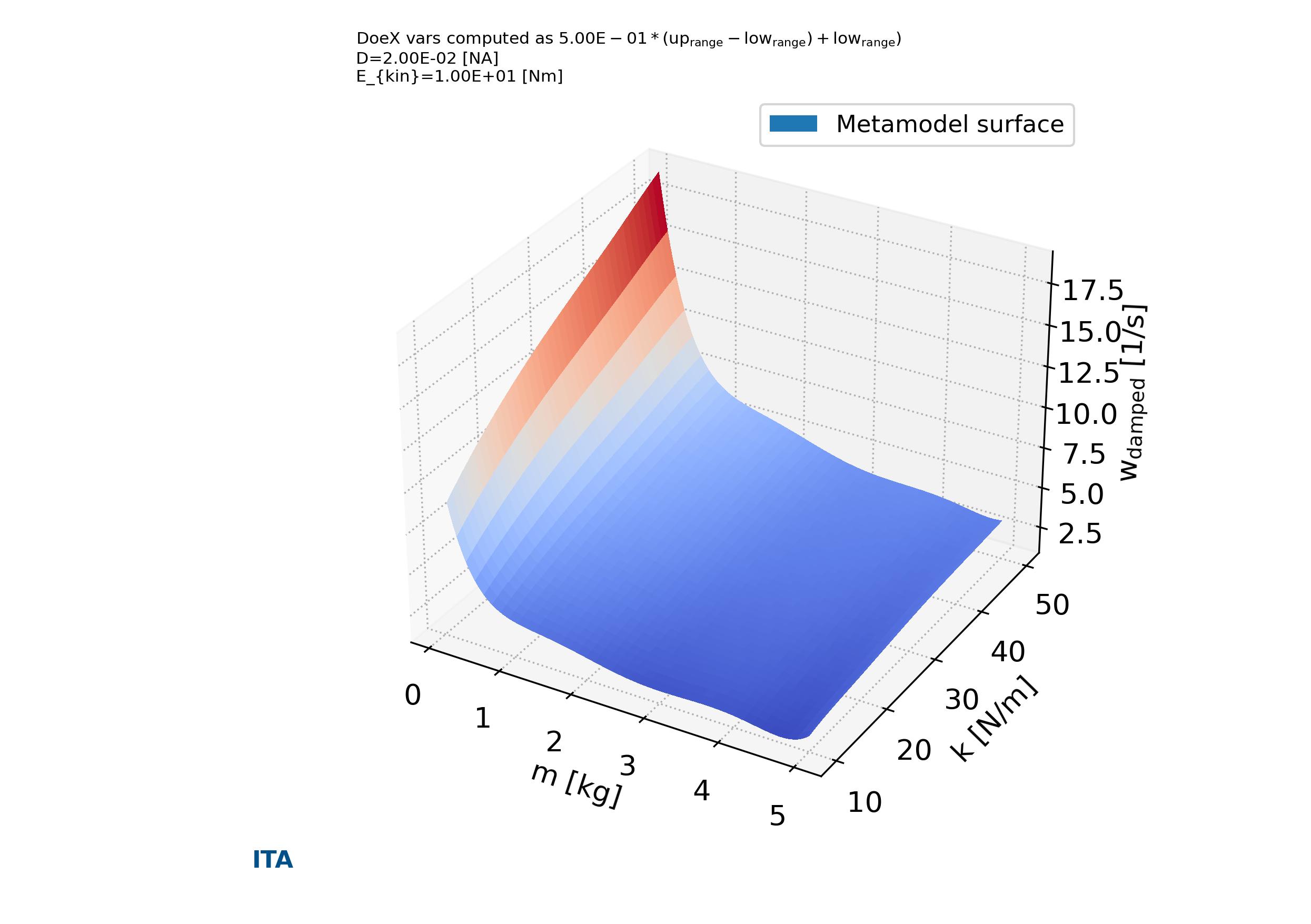
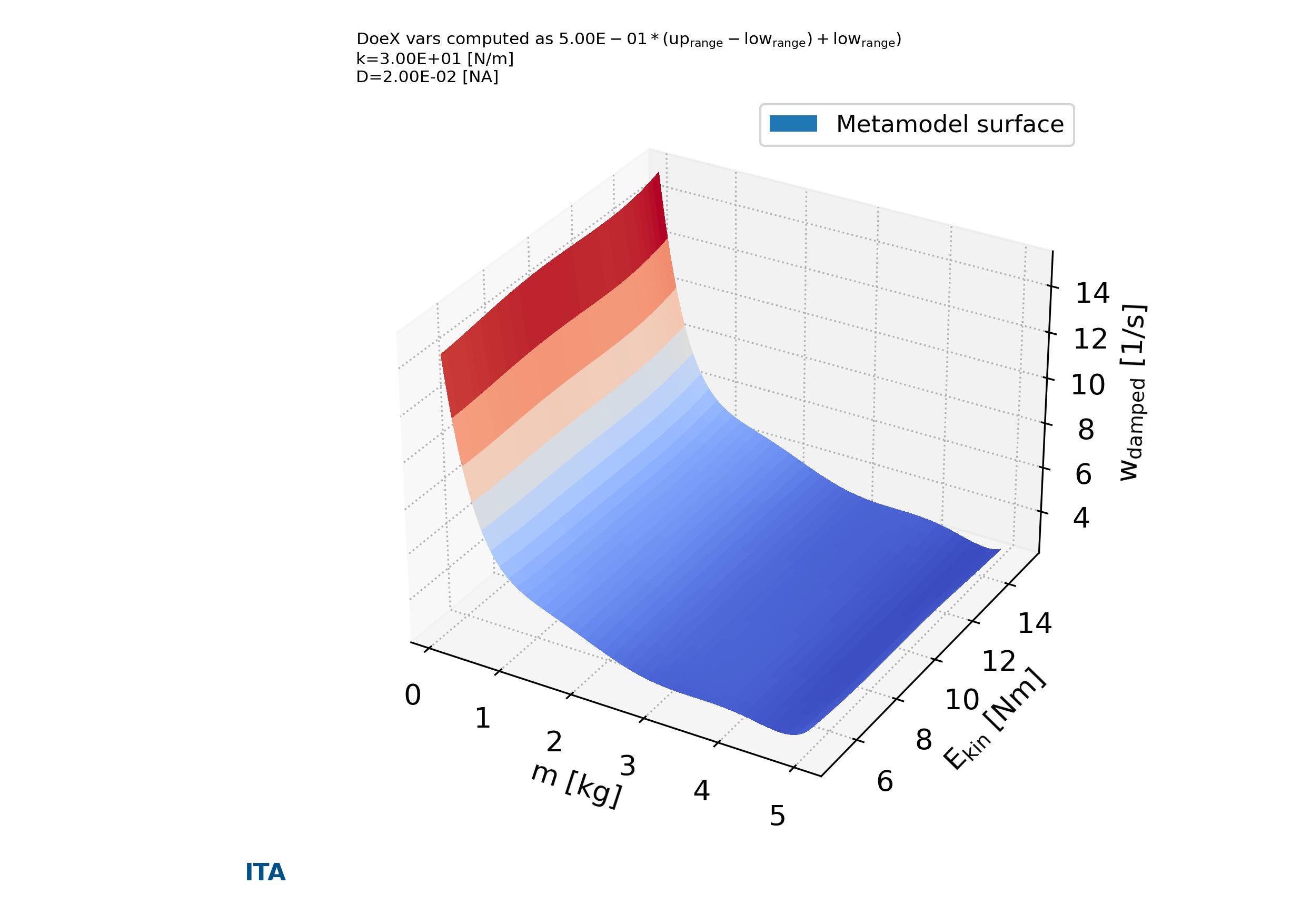
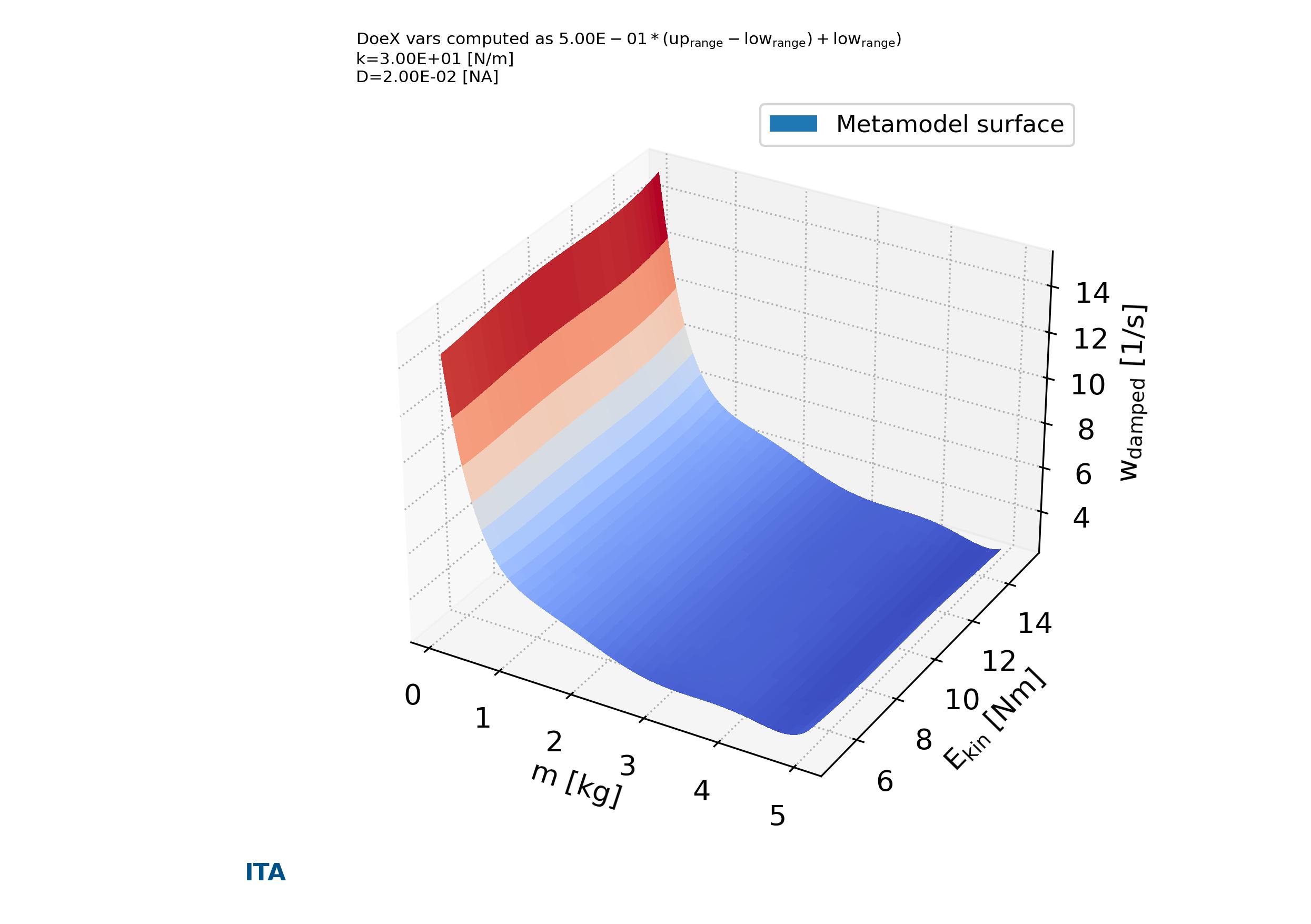
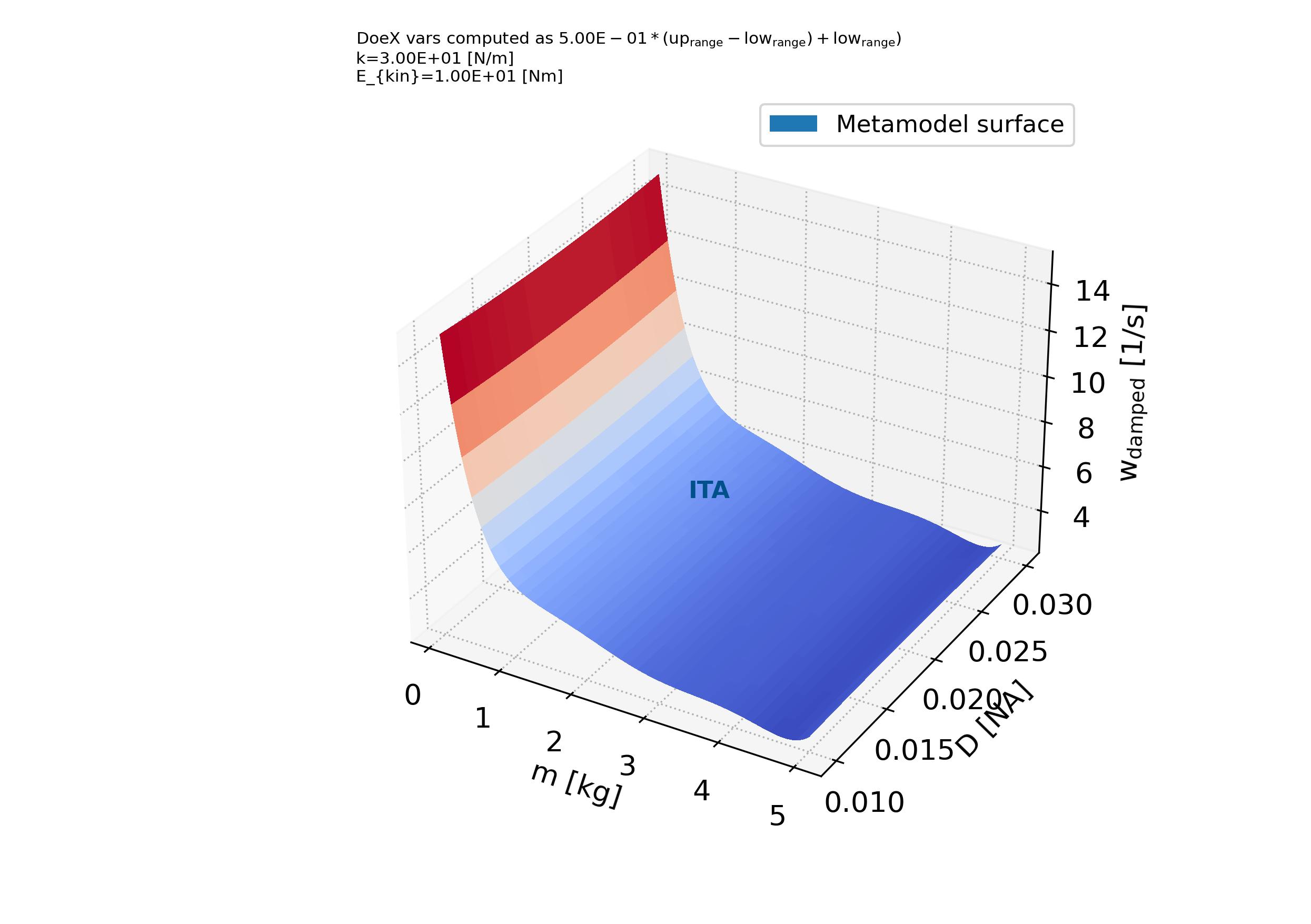
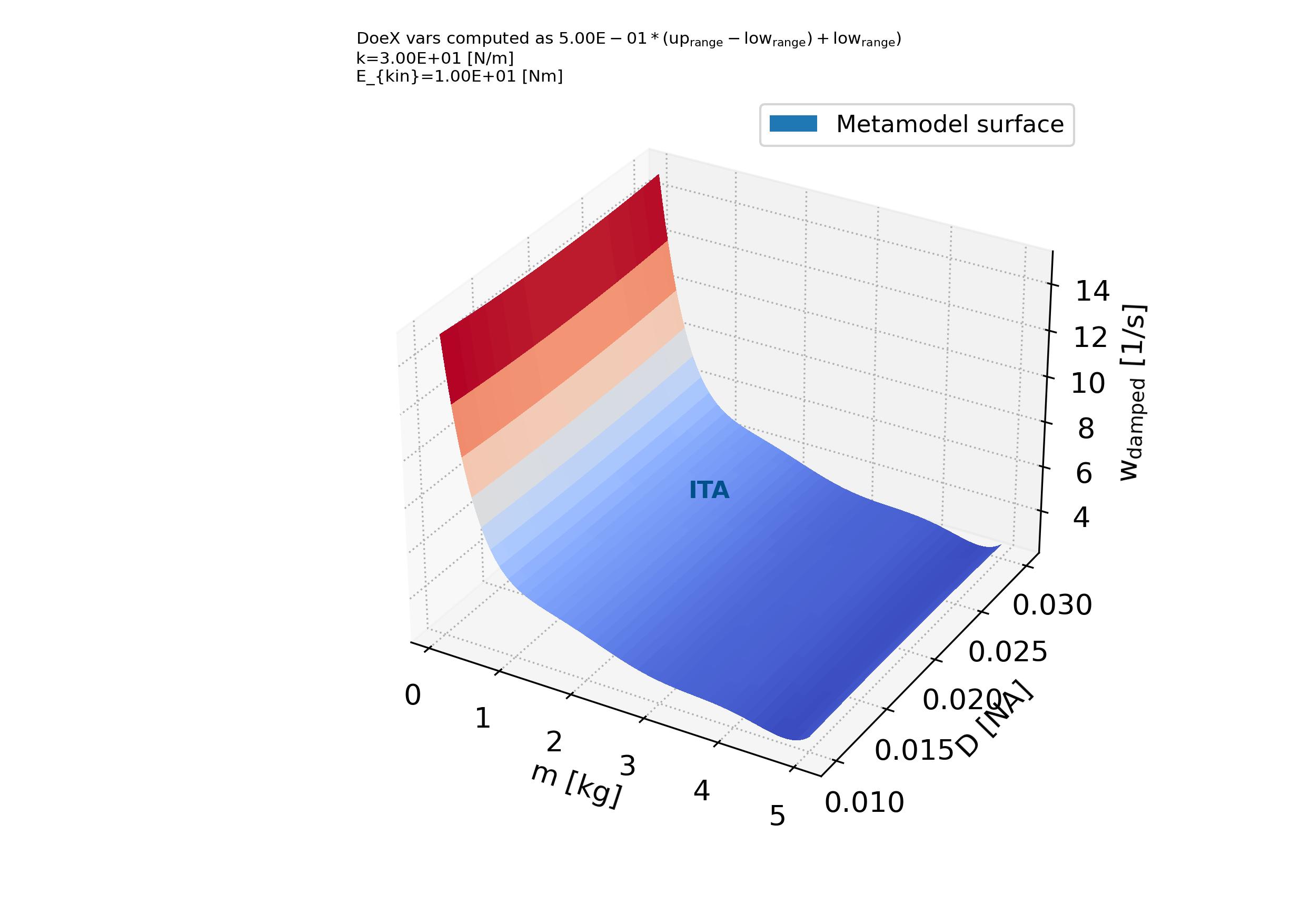
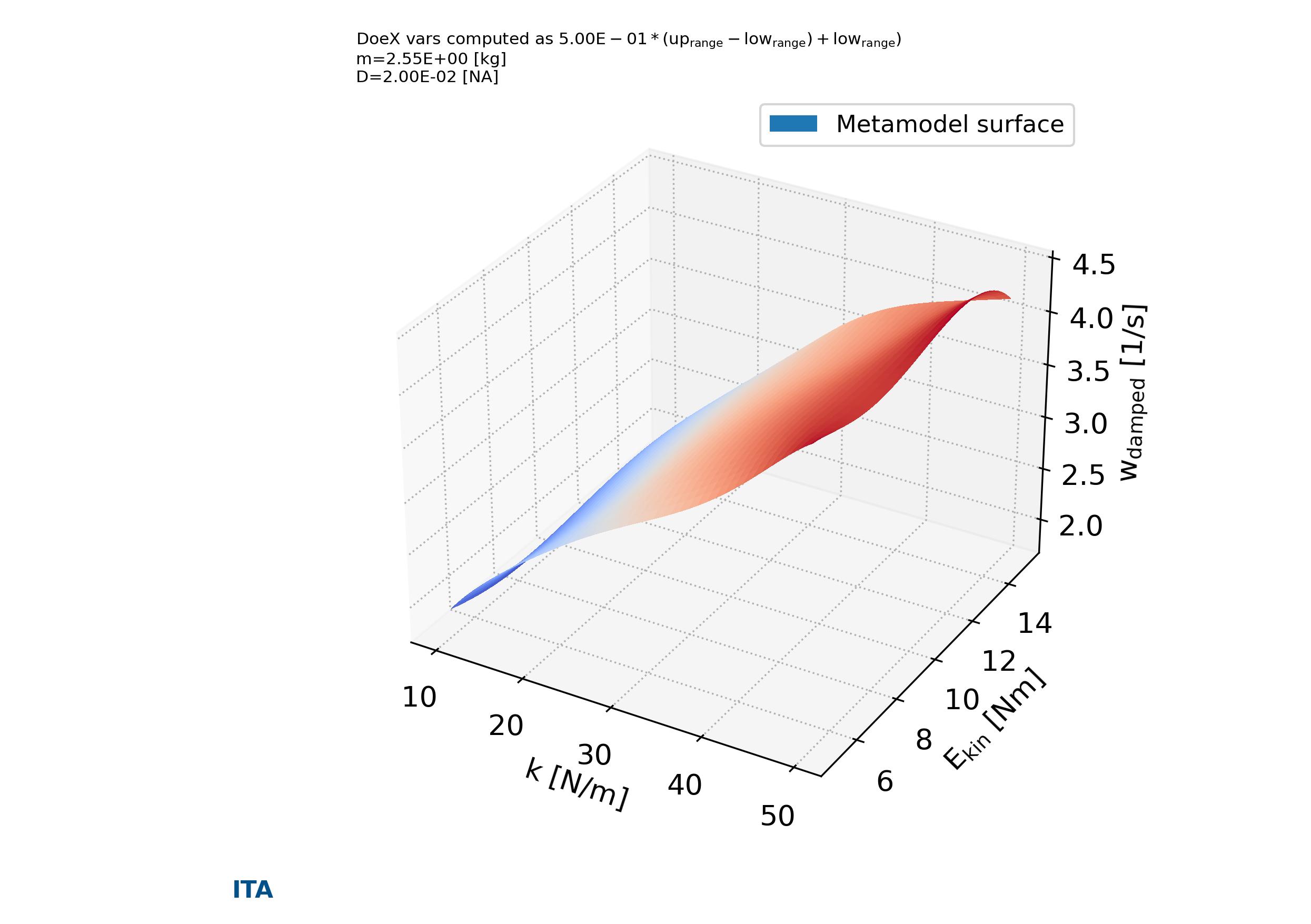
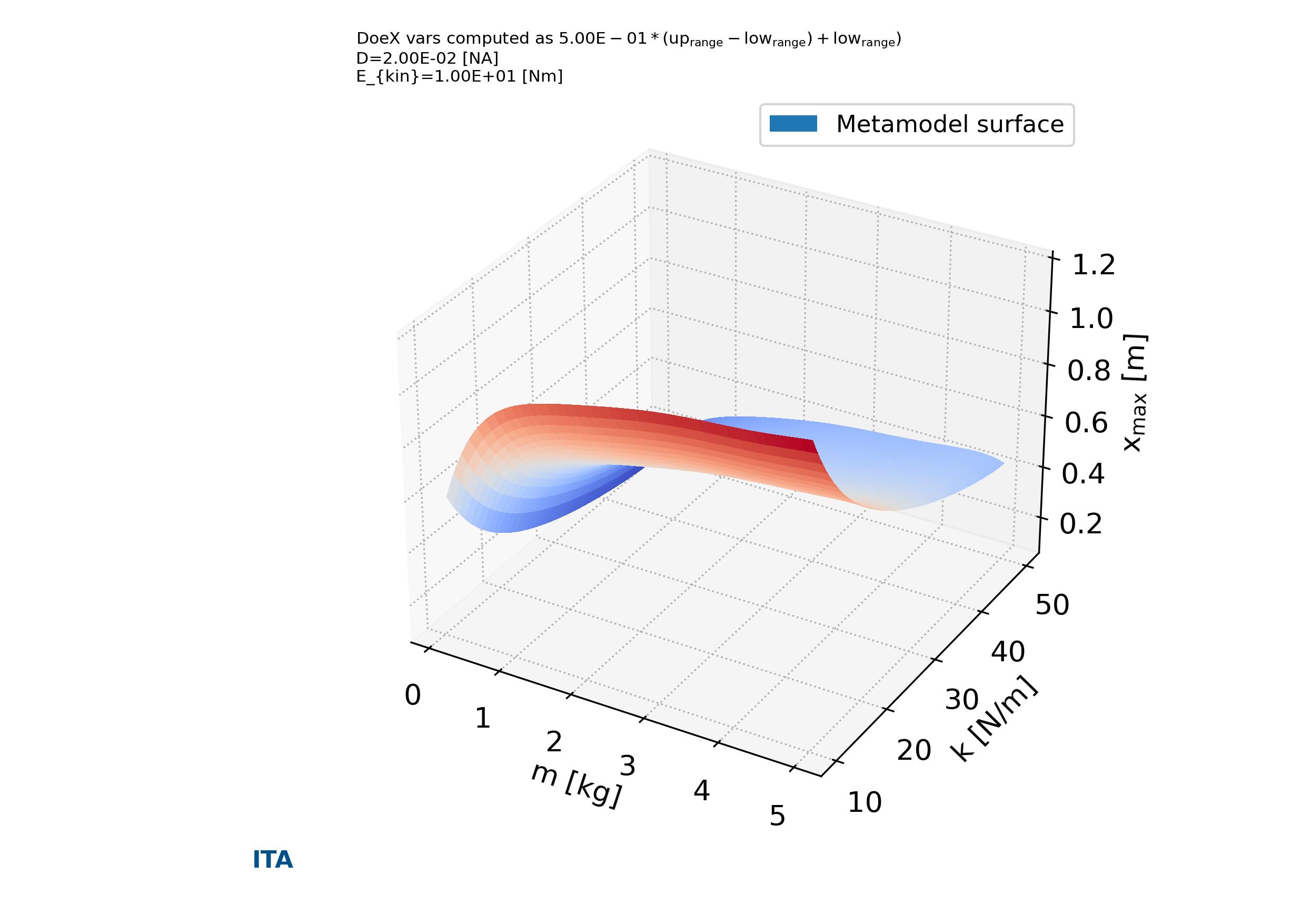
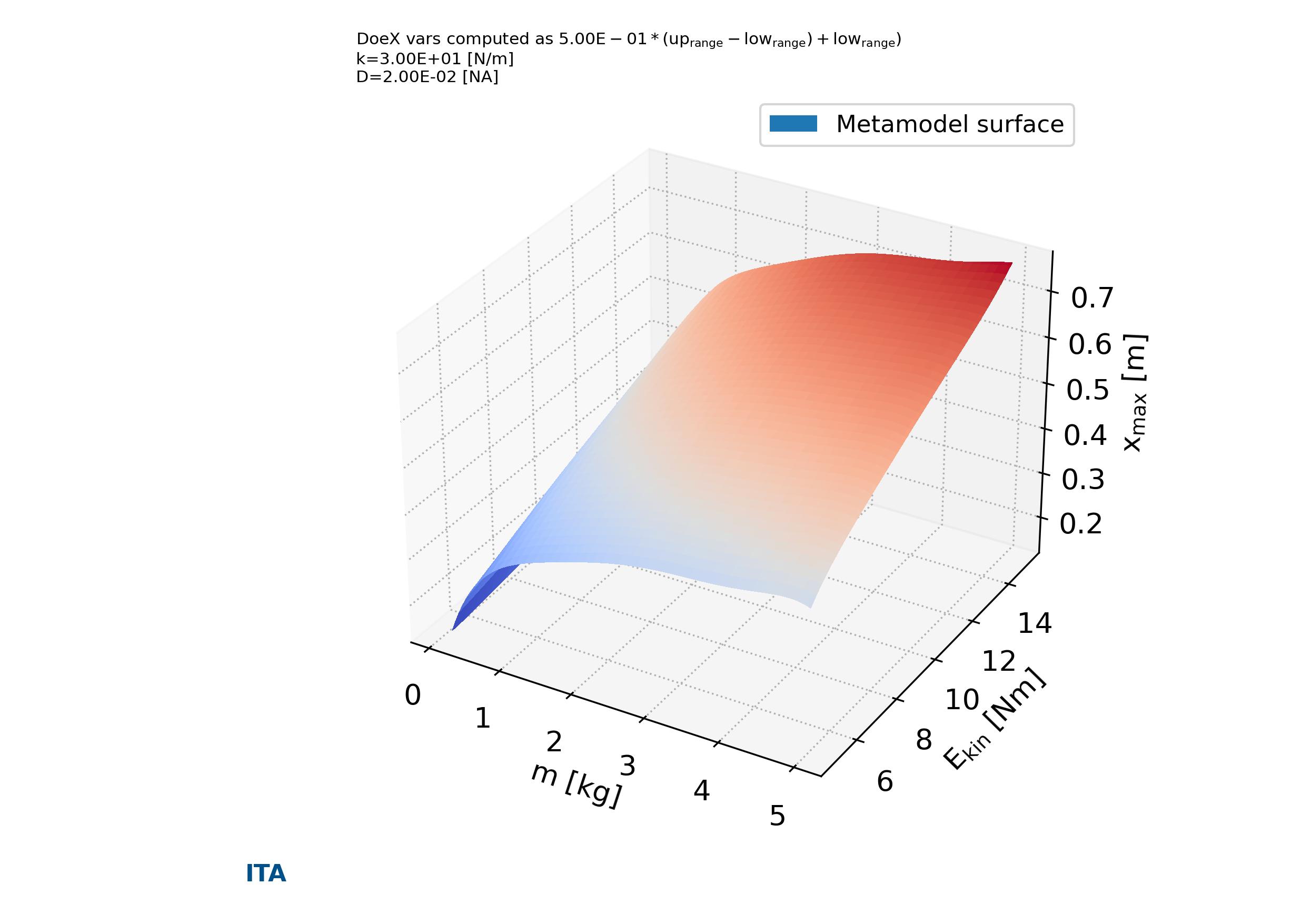
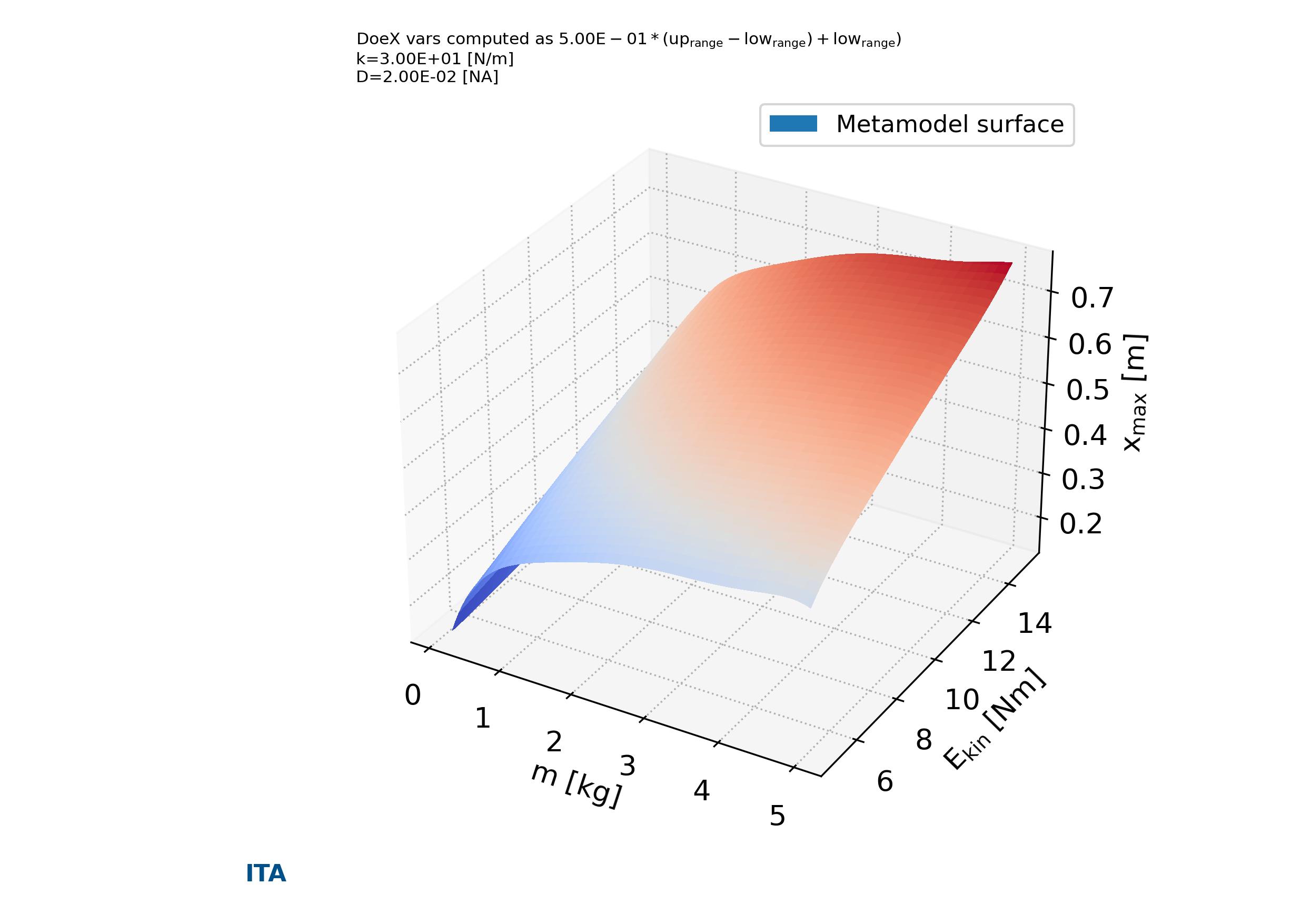
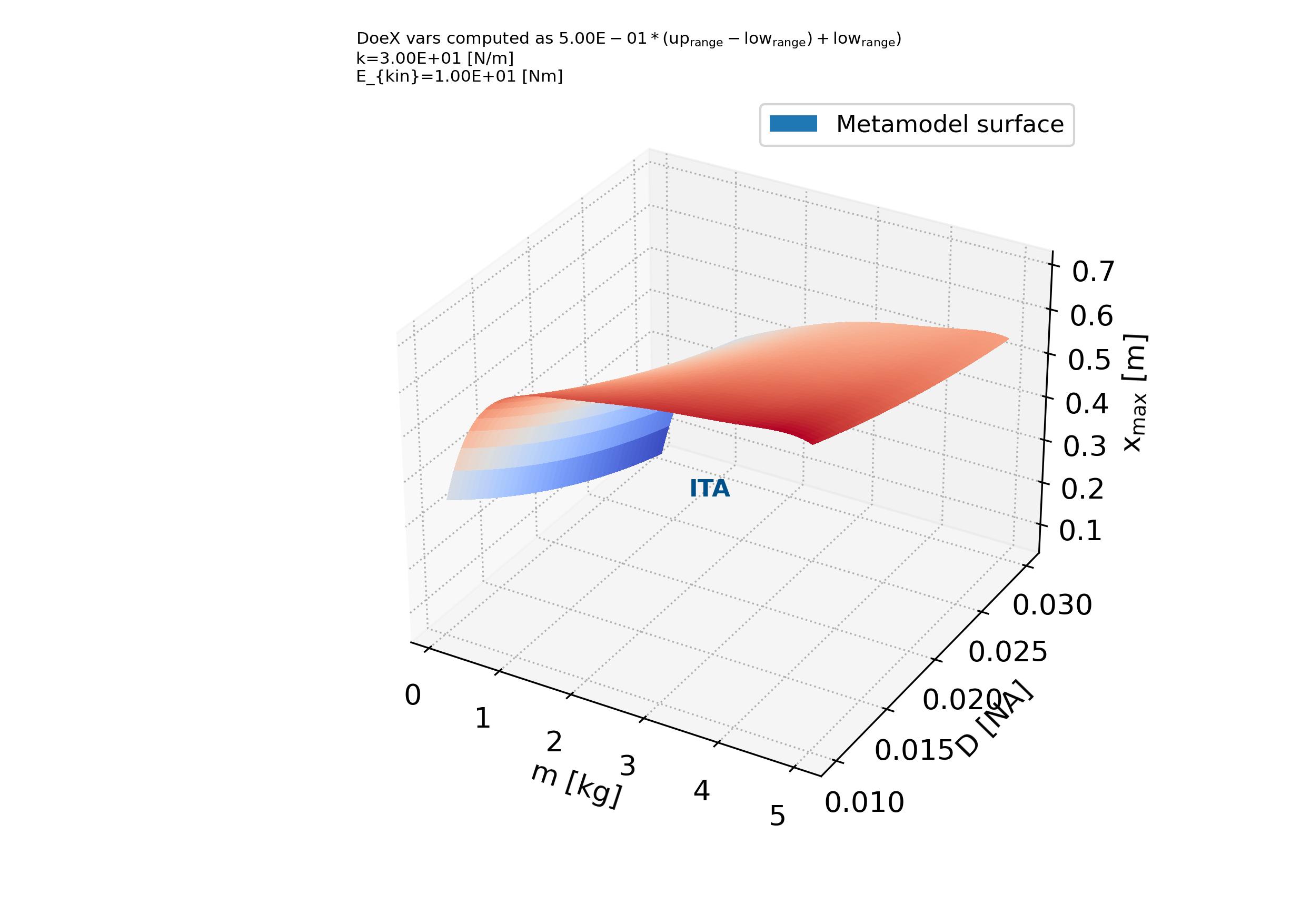
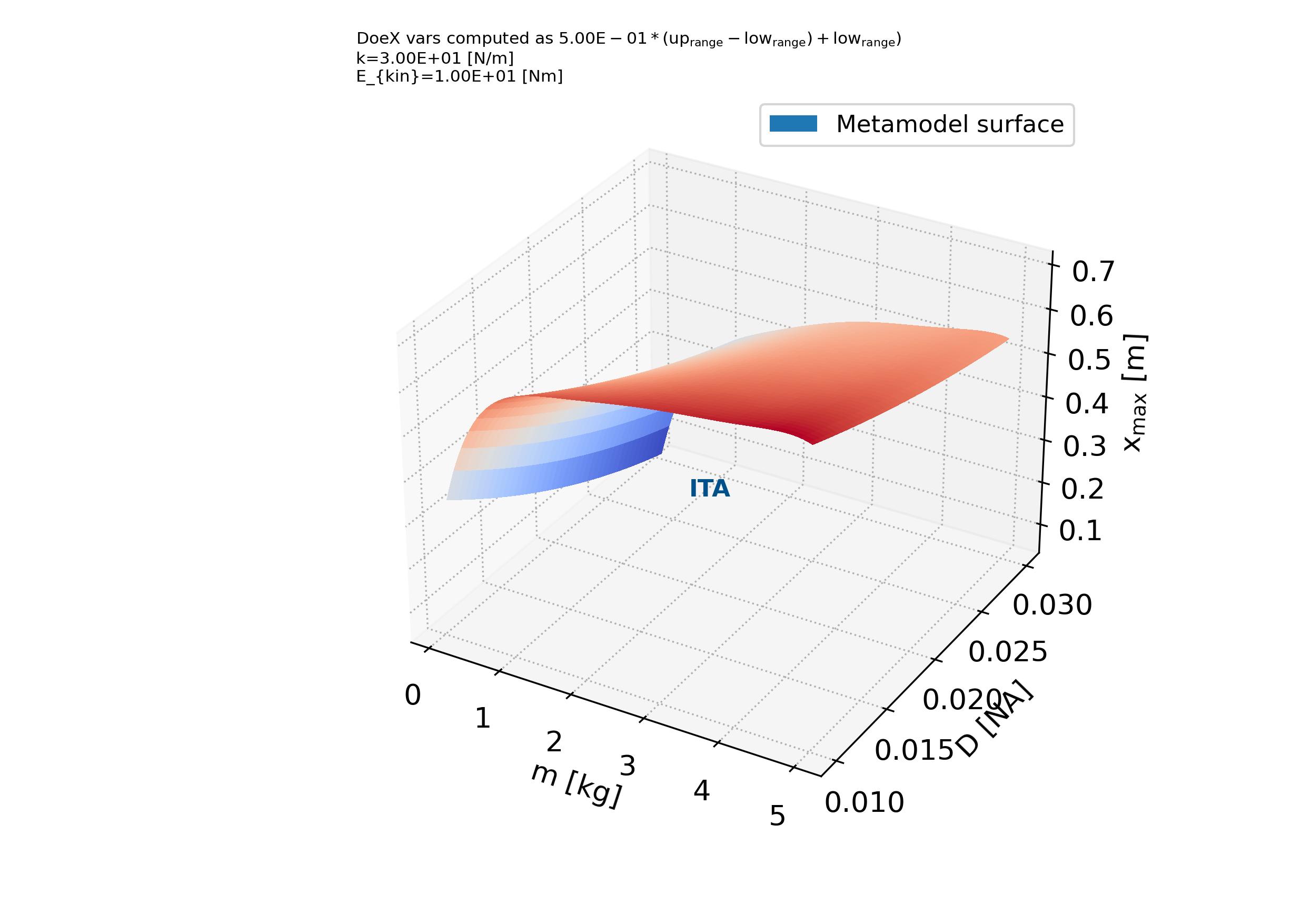
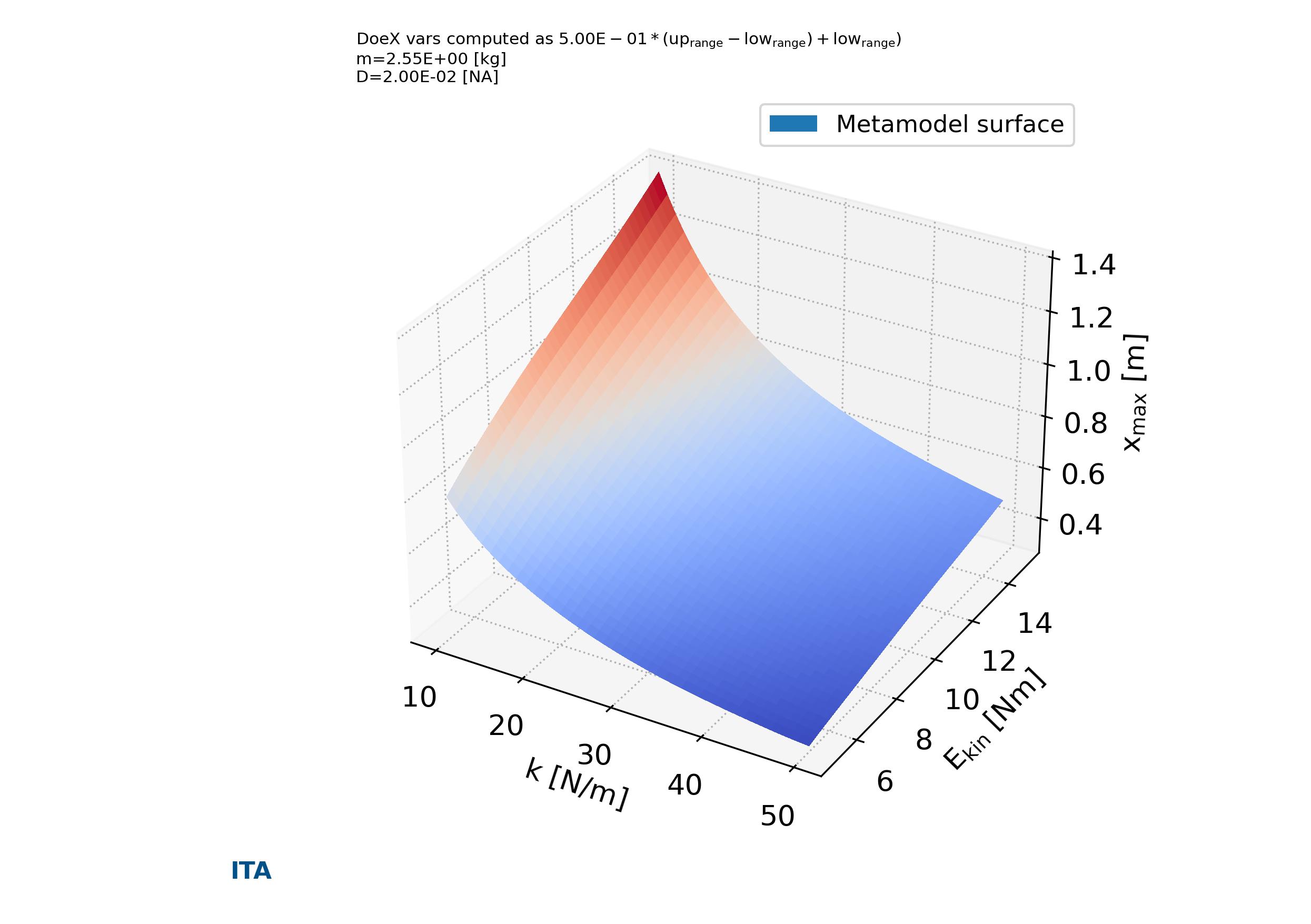
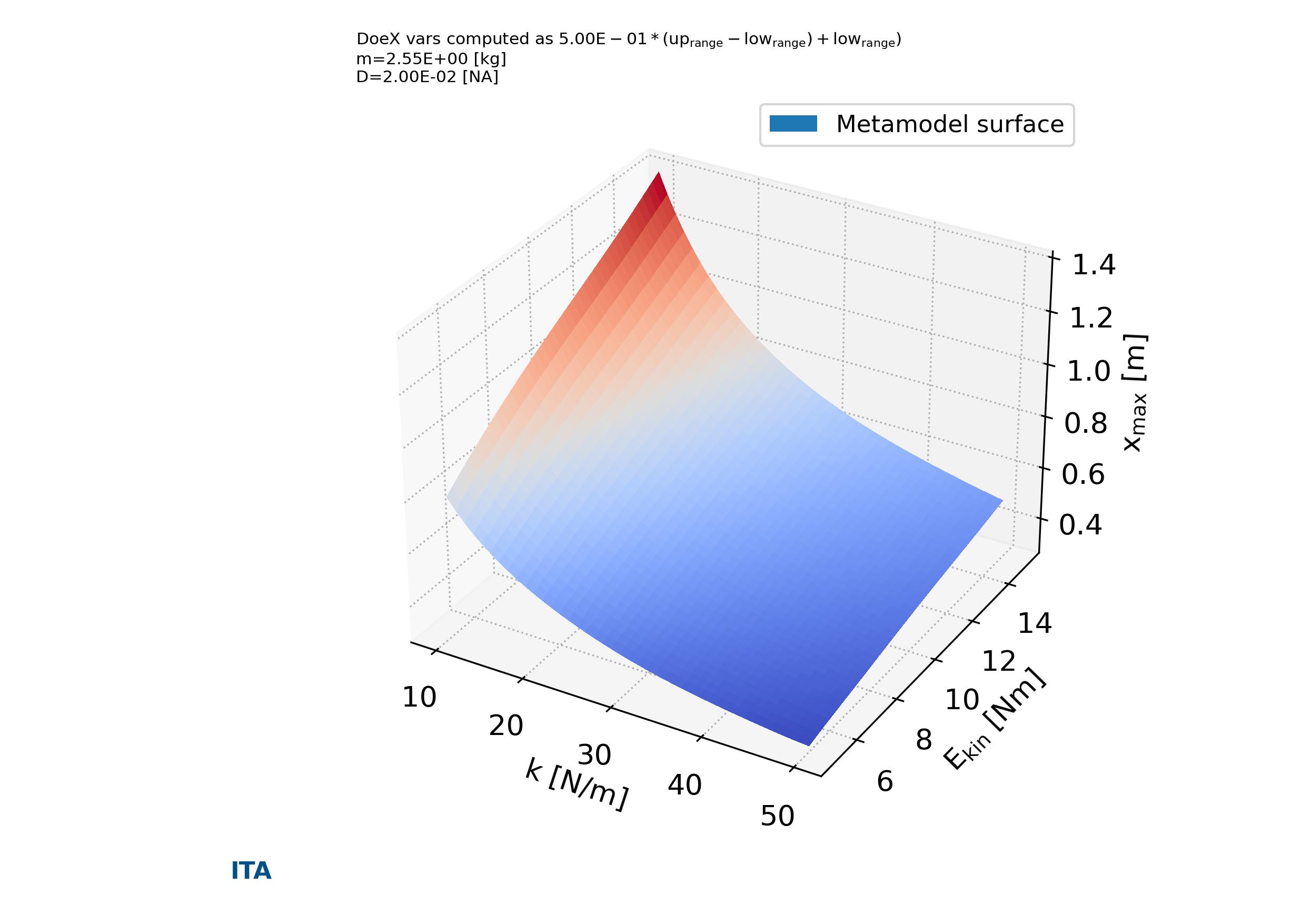
In addition, the function output_plts_models_XYZ() plot all the combinations of XYZ plots showing the prediction surfaces constructed using the ML metamodel. An example can be seen from Fig. 4.5.4 to Fig. 4.5.13.

parse-figure

Fig. 4.5.4 Metamodels surface of variable \(m\) versus \(k\) versus \(x_{max}\) in case_2. Tutorial A05

parse-figure

Fig. 4.5.5 Metamodels surface of variable \(m\) versus \(E_{kin}\) versus \(x_{max}\) in case_2. Tutorial A05

parse-figure

Fig. 4.5.6 Metamodels surface of variable \(m\) versus \(D\) versus \(x_{max}\) in case_2. Tutorial A05

parse-figure

Fig. 4.5.7 Metamodels surface of variable \(k\) versus \(E_{kin}\) versus \(x_{max}\) in case_2. Tutorial A05

parse-figure

Fig. 4.5.8 Metamodels surface of variable \(k\) versus \(D\) versus \(x_{max}\) in case_2. Tutorial A05

parse-figure

Fig. 4.5.9 Metamodels surface of variable \(E_{kin}\) versus \(D\) versus \(x_{max}\) in case_2. Tutorial A05

parse-figure

Fig. 4.5.10 Metamodels surface of variable \(m\) versus \(k\) versus \(w_{damped}\) in case_2. Tutorial A05

parse-figure

Fig. 4.5.11 Metamodels surface of variable \(m\) versus \(E_{kin}\) versus \(w_{damped}\) in case_2. Tutorial A05

parse-figure

Fig. 4.5.12 Metamodels surface of variable \(m\) versus \(D\) versus \(w_{damped}\) in case_2. Tutorial A05

parse-figure

Fig. 4.5.13 Metamodels surface of variable \(k\) versus \(E_{kin}\) versus \(w_{damped}\) in case_2. Tutorial A05

4.6. Tutorial case A06: “Minimization of the Kursawe Functions”

In this tutorial is described the extension of tutorial A04 Section 4.4 regarding the Kursawe Functions with the minimization of one of the Kursawe functions according a non linear constrain. This problem is described in Eq.4.4.1.

\begin{equation} optimization \begin{cases} min[f_{2}(x)] \\ constrains: \\ \quad \quad f_{1}(x) \leqslant -14.5 \end{cases} \end{equation}

The input and output variable for each of the analysis cases are define in the problem definition spreadsheet file (Download: Problem definition spreadsheet file).

The same model as in tutorial A04 (see Section 4.4) is used. The analysis is performed with pymetamodels based on a basic analysis script as follows in test_analysis.py (see Listing 4.6.1).

Apart of the sensitivity analysis and metamodeling construction carried out in tutorial A04. The optimization routine is call with the function run_optimization_problem() using a “general_fast” schema approach. The optimization problem is solve resulting in Eq.4.6.2.

\begin{equation} \begin{cases} optimization\\ result \end{cases} \begin{cases} min[f_{2}(x)] = -7.5074 \\ constrains: \\ \quad \quad f_{1}(x) \leqslant -14.5 \\ where, \\ f_{1}(x)=-14.5000 \\ [X_1, X_2, X_3] = [-1.30575601, -0.87599992, -1.33713208] \end{cases} \end{equation}
Listing 4.6.1 Kursawe Functions test analysis. Minimization of the Kursawe Functions
  1#!/usr/bin/env python3
  2
  3## Analytical model,
  4##
  5
  6import os, sys, random
  7import numpy as np
  8import gc
  9
 10import pymetamodels
 11import kursawe_model as model_obj
 12
 13class analysis(object):
 14
 15    """
 16
 17    .. _model_kursawe_model_optimize:
 18
 19    **Synopsis:**
 20        * Analysis framework with pymetamodels
 21        * Coupled function tutorial
 22
 23    """
 24
 25    def __init__(self):
 26        
 27        ## Initial variables
 28        self.name = "kuwase_optimize"
 29        self.folder_script = os.path.dirname(os.path.realpath(__file__))
 30
 31        self.folder_path_inputs = self.folder_script
 32
 33        self.folder_path_outputs = os.path.join(os.path.join(os.path.join(self.folder_script, os.pardir), "_examples_raw"),self.name + "_out")
 34        if not os.path.exists(self.folder_path_outputs): os.makedirs(self.folder_path_outputs)
 35
 36        self.file_name_inputs = r"configuration_spreadsheet"
 37        self.file_name_outputs = r"outputs"
 38
 39        ## Initialise 
 40        self.mita = pymetamodels.load()
 41        self.mita.logging_start(self.folder_path_outputs)          
 42
 43    def run_model(self):
 44
 45        ## Inputs load
 46        folder_path = self.folder_path_inputs
 47        file_name = self.file_name_inputs
 48        self.mita.read_xls_case(folder_path, file_name, sheet="cases", col_start = 0, row_start = 1, tit_row = 0 )
 49
 50        ## Sampling
 51        for case in self.mita.keys():
 52
 53            ## Run samplimg cases
 54            self.mita.run_sampling_routine(case)
 55
 56            ## Run / Load model
 57            self.model_iteration(case, model_obj)
 58
 59            ## Sensitivity analysis
 60            self.mita.run_sensitivity_analisis(case)
 61
 62            ## Metamodeling construction
 63            if self.mita.load_metamodel(self.folder_path_outputs, case):
 64                pass
 65            else:
 66                self.mita.run_metamodel_construction(case, scheme = "general_fast")
 67
 68                ## Save metamodels .metaita
 69                self.mita.save_metamodel(self.folder_path_outputs, case)
 70
 71            ## Solve optimization problem
 72            self.mita.run_optimization_problem(case, scheme = "general_fast", verbose_testing = True)
 73
 74        ##
 75        self.mita.run_sensitivity_normalization()
 76
 77        ## Ploting and others
 78        for case in self.mita.keys():
 79
 80            ## Save DOEX and DOEY
 81
 82            ## Plots cross varible relation in the sensitivity analysis
 83            self.mita.output_plts_sensitivity(self.folder_path_outputs, case)
 84
 85            ## Plots showing the model DOEX and DOEY variables relationship 2D XY
 86            self.mita.output_plts_models_XY(self.folder_path_outputs, case)
 87
 88            ## Residual values plots
 89            self.mita.output_plts_models_residuals_plot(self.folder_path_outputs, case)
 90
 91            ## Plots showing the model DOEX and DOEY variables relationship 3D XYZ
 92            self.mita.output_plts_models_XYZ(self.folder_path_outputs, case, scatter = False)
 93
 94        ## Output variables save
 95        folder_path = self.folder_path_outputs
 96        file_name = self.file_name_outputs
 97        out_path = self.mita.output_xls(folder_path, file_name, col_start = 0, tit_row = 0)
 98
 99    def model_iteration(self, case, _model_obj):
100
101        ## Model iteration to generate Y doe output values
102        doeX = self.mita.doeX(case)
103        doeY = self.mita.doeY(case)
104        vars_in = self.mita.vars_parameter_matrix(case)
105        case_dict = self.mita.case[case]
106        samples = len(doeX[list(doeX.keys())[0]])
107
108        for ii in range(0, samples):
109
110            obj_model = _model_obj.model_obj()
111
112            # initialize dictionaries
113            obj_model.doeX = doeX
114            obj_model.doeY = doeY
115            obj_model.case_dict = case_dict
116            obj_model.ii = ii
117            obj_model.vars_in = vars_in
118
119            # add variables as atributes
120            for key in obj_model.doeX.keys():
121                setattr(obj_model, key, obj_model.doeX[key][obj_model.ii])
122
123            # run the model for ii sample
124            obj_model.run_model()
125
126if __name__ == "__main__":
127
128    analysis = analysis()
129
130    analysis.run_model()
4.7. Tutorial case A07: “Calibration of a damped oscillator”

In this tutorial is described the extension of tutorial A05 Section 4.5 regarding a damped oscillator with the calibration of the oscillating system according a given reference signal. This problem is described in Eq.4.7.1.

\begin{equation} \begin{cases} optimization \begin{cases} calibrate[(simulation,reference)] = 0 \\ constrains: \\ \quad \quad w_{damped} \leq 10 \ \text{[1/s]} \\ \quad \quad m \in [0.1, 5.0] \ \text{[kg]} \\ \quad \quad k \in [10, 50] \ \text{[N/m]} \\ \quad \quad D \in [0.01, 0.05] \\ \quad \quad E_{kin} \in [10, 50] \ \text{[Nm]} \\ \end{cases} \\ \end{cases} \end{equation}

The input and output variable for each of the analysis cases are define in the problem definition spreadsheet file (Download: Problem definition spreadsheet file).

The same model as in tutorial A05 (see Section 4.5) is used, with a small modification. The constrain function and the objective function to be minimize as equal to zero has been added (see Listing 4.7.2). In addition the reference signal to be math in the calibration is loaded (Download: Reference signal spreadsheet file) in order to build the objective function.

The analysis is performed with pymetamodels based on a basic analysis script as follows in test_analysis.py (see Listing 4.7.1). Apart of the sensitivity analysis and metamodeling construction carried out in tutorial A05. The optimization routine is call with the function run_optimization_problem() using a “general_fast” schema approach.

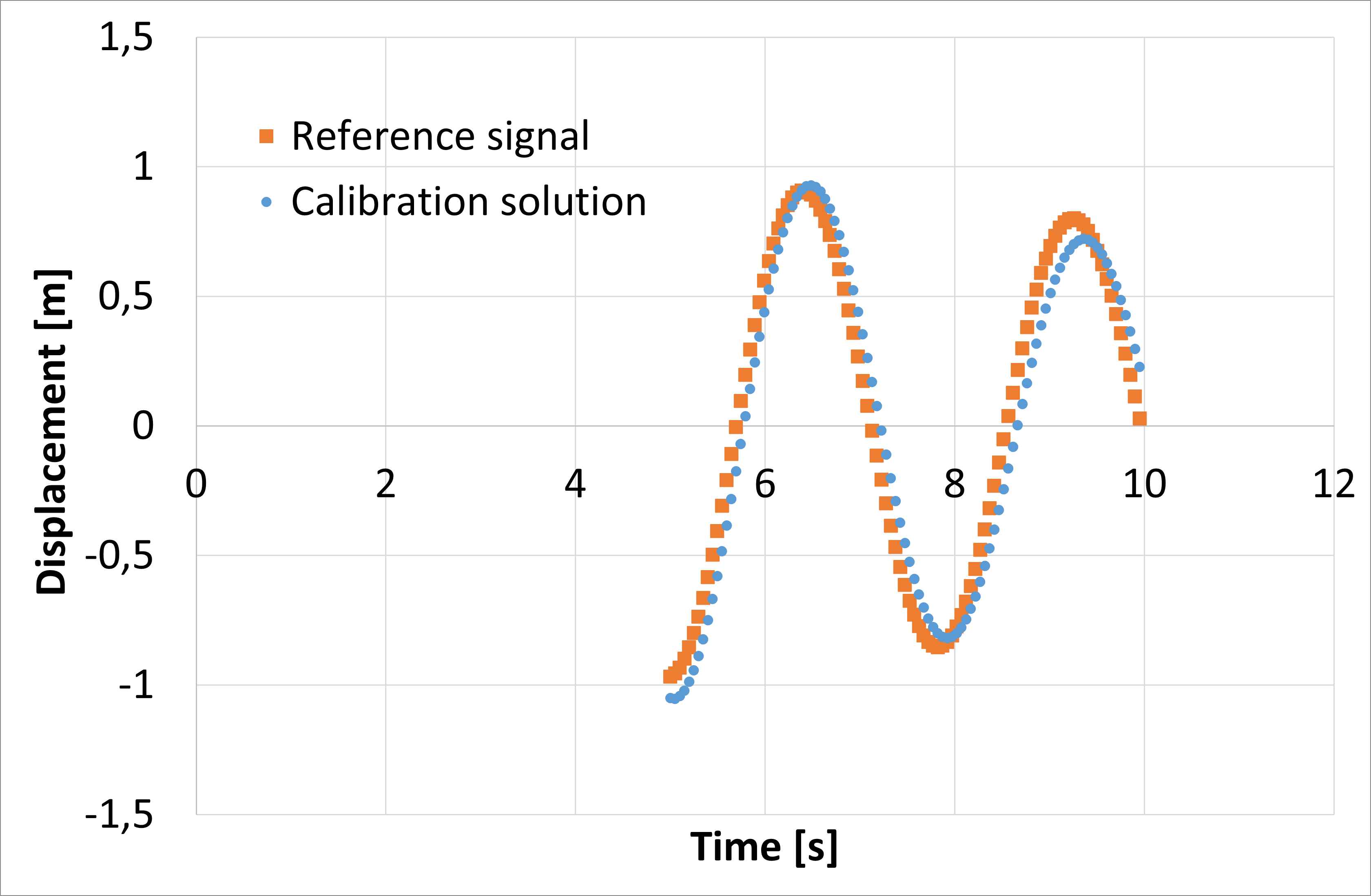
The calibration problem is solve resulting in Eq.4.7.2. When the reference and simulation signal for the aforementioned values are compared in Fig. 4.7.1 showing a good agreement for the calibration solution values.

\begin{equation} \begin{cases} optimization \begin{cases} calibrate[(simulation,reference)] = -8.7e-04 \\ constrains: \\ \quad \quad x_{max} = 4.45555556 \ \text{[m]} \\ \quad \quad w_{damped} = 2.02715485 \ \text{[1/s]} \\ \quad \quad m = 3.775 \ \text{[kg]} \\ \quad \quad k = 15. \ \text{[N/m]} \\ \quad \quad D = 0.04 \\ \quad \quad E_{kin} = 10. \ \text{[Nm]} \\ \end{cases} \\ \end{cases} \end{equation}
parse-figure

Fig. 4.7.1 Damped oscillator calibration. Tutorial A07

Listing 4.7.1 Damped oscillator test analysis. Calibration analysis
  1#!/usr/bin/env python3
  2
  3## Analytical model,
  4##
  5
  6import os, sys, random
  7import numpy as np
  8import gc
  9
 10import pymetamodels
 11import damped_model as model_obj
 12
 13class analysis(object):
 14
 15    """
 16
 17    .. _model_damped_oscillator_optimize:
 18
 19    **Synopsis:**
 20        * Analysis framework with pymetamodels
 21        * Coupled function tutorial
 22
 23    """
 24
 25    def __init__(self):
 26
 27        ## Initial variables
 28        self.name = "damped_oscillator_op"
 29        self.folder_script = os.path.dirname(os.path.realpath(__file__))
 30
 31        self.folder_path_inputs = self.folder_script
 32
 33        self.folder_path_outputs = os.path.join(os.path.join(os.path.join(self.folder_script, os.pardir), "_examples_raw"),self.name + "_out")
 34        if not os.path.exists(self.folder_path_outputs): os.makedirs(self.folder_path_outputs)
 35
 36        self.file_name_inputs = r"configuration_spreadsheet"
 37        self.file_name_outputs = r"outputs"
 38
 39        ## Initialise 
 40        self.mita = pymetamodels.load()
 41        self.mita.logging_start(self.folder_path_outputs)          
 42
 43    def run_model(self):
 44
 45        ## Inputs load
 46        folder_path = self.folder_path_inputs
 47        file_name = self.file_name_inputs
 48        self.mita.read_xls_case(folder_path, file_name, sheet="cases", col_start = 0, row_start = 1, tit_row = 0 )
 49
 50        ## Sampling
 51        for case in self.mita.keys():
 52
 53            ## Run samplimg cases
 54            self.mita.run_sampling_routine(case)
 55
 56            ## Run / Load model
 57            self.model_iteration(case, model_obj)
 58
 59            ## Sensitivity analysis
 60            self.mita.run_sensitivity_analisis(case)
 61
 62            ## Metamodeling construction
 63            if self.mita.load_metamodel(self.folder_path_outputs, case):
 64                pass
 65            else:
 66                #self.mita.run_metamodel_construction(case, scheme = "general_fast")
 67                self.mita.run_metamodel_construction(case, scheme = "neural")
 68
 69                ## Save metamodels .metaita
 70                self.mita.save_metamodel(self.folder_path_outputs, case)
 71
 72            ## Solve optimization problem
 73            if self.mita.load_optimization(self.folder_path_outputs, case):
 74                pass
 75            else:
 76                max_size_grid_methods = 5e4
 77                self.mita.run_optimization_problem(case, scheme = "general_fast", max_size_grid_methods = max_size_grid_methods, verbose_testing = False)
 78
 79                ## Save optimization .optita
 80                self.mita.save_optimization(self.folder_path_outputs, case)
 81
 82        ##
 83        self.mita.run_sensitivity_normalization()
 84
 85        ## Ploting and others
 86        for case in self.mita.keys():
 87
 88            ## Save DOEX and DOEY
 89
 90            ## Plots cross varible relation in the sensitivity analysis
 91            self.mita.output_plts_sensitivity(self.folder_path_outputs, case)
 92
 93            ## Plots showing the model DOEX and DOEY variables relationship 2D XY
 94            self.mita.output_plts_models_XY(self.folder_path_outputs, case)
 95
 96            ## Residual values plots
 97            self.mita.output_plts_models_residuals_plot(self.folder_path_outputs, case)
 98
 99            ## Plots showing the model DOEX and DOEY variables relationship 3D XYZ
100            self.mita.output_plts_models_XYZ(self.folder_path_outputs, case, scatter = False)
101
102        ## Output variables save
103        folder_path = self.folder_path_outputs
104        file_name = self.file_name_outputs
105        out_path = self.mita.output_xls(folder_path, file_name, col_start = 0, tit_row = 0)
106
107    def model_iteration(self, case, _model_obj):
108
109        ## Model iteration to generate Y doe output values
110        doeX = self.mita.doeX(case)
111        doeY = self.mita.doeY(case)
112        vars_in = self.mita.vars_parameter_matrix(case)
113        case_dict = self.mita.case[case]
114        samples = len(doeX[list(doeX.keys())[0]])
115
116        for ii in range(0, samples):
117
118            obj_model = _model_obj.model_obj()
119
120            # initialize dictionaries
121            obj_model.doeX = doeX
122            obj_model.doeY = doeY
123            obj_model.case_dict = case_dict
124            obj_model.ii = ii
125            obj_model.vars_in = vars_in
126
127            # add variables as atributes
128            for key in obj_model.doeX.keys():
129                setattr(obj_model, key, obj_model.doeX[key][obj_model.ii])
130
131            # run the model for ii sample
132            obj_model.run_model()
133
134if __name__ == "__main__":
135
136    analysis = analysis()
137
138    analysis.run_model()
Listing 4.7.2 Damped oscillator model code block. Calibration analysis
 1#!/usr/bin/env python3
 2
 3## damped oscillator
 4##
 5
 6import os, sys, random
 7import numpy as np
 8from math import exp, pow, sqrt, sin
 9import pymetamodels
10
11class model_obj(object):
12
13    """
14
15    .. _model_id_001_damped_oscillator_op:
16
17    **Damped oscillator functions model**
18
19    :platform: Unix, Windows
20    :synopsis: Damped oscillator
21    :author:
22
23    :Dependences:
24
25    """
26
27    def __init__(self):
28
29        ## Initial variables
30        self.doeX = None
31        self.doeY = None
32        self.case_dict = None
33        self.ii = None
34
35    def run_model(self):
36
37        # variables
38        m = self.doeX["m"][self.ii] #kg [0.1,5.0]
39        k = self.doeX["k"][self.ii] # N/m [20,50]
40
41        D = self.doeX["D"][self.ii]
42        Ekin = self.doeX["E_{kin}"][self.ii] #10 [Nm]
43
44        # calculations
45        omega_0 = (k/m)**0.5 #w_0
46        omega = omega_0 * (1-(D**2.))**0.5 #w
47        v_0 = ((2*Ekin)/m)**0.5
48
49        num_steps = 101
50        t_max =  10
51        t_observe = 5 # x(t>5) -> min
52
53        # time serie
54        t_serie = []
55        for ii in range(0,num_steps):
56            t_serie.append(t_observe+ii*float(t_max-t_observe)/num_steps)
57
58        # ------------------------- #
59        #   Results
60        # ------------------------- #
61        # time serie values
62        x_serie = []
63        for ii in range(0,num_steps):
64            tt_serie = t_serie[ii]
65            xx_serie = exp(-1*D*omega_0*tt_serie)*(v_0/omega)*sin(omega*tt_serie)
66            x_serie.append(xx_serie)
67
68        # find max value
69        ref = None
70        for ii in range(0,num_steps):
71            if ref is None: ref = abs(x_serie[ii])
72            if abs(x_serie[ii]) >= ref: ref = abs(x_serie[ii])
73
74        x_max = ref
75
76        w_damped = omega_0 * (1-(D**2.))**0.5
77
78        # compute simulation - reference absolute value
79        mmita = pymetamodels.load()
80        file_name = "reference.csv"
81        path_out = os.path.dirname(os.path.realpath(__file__))
82        reference, units = mmita.read_table_csv_channels(file_name, path_out, units_chn = False)
83        x_serie = np.asarray(x_serie,dtype=np.dtype('float64'))
84        reference = np.asarray(reference["disp"],dtype=np.dtype('float64'))
85        if len(x_serie) - len(reference) != 0: error
86
87        # outputs
88        self.doeY["x_{max}"][self.ii] = x_max
89        self.doeY["w_{damped}"][self.ii] = w_damped
90        self.doeY["cons-w_{damped}"][self.ii] = 10.-w_damped
91        self.doeY["min-obj"][self.ii] = np.sum(np.square(x_serie-reference))

4.8. Tutorial case A08: “Building the configuration spreadsheet programatically”

Based in the tutorial related with the coupled function, in this tutorial is described how to build the configuration spreadsheet programatically using the objconf(). The analysis includes the sampling, metamodeling and optimization routines.

The code to print the data structure objects are described in the script as follows in test_analysis.py,

Listing 4.8.1 Coupled function test analysis. Objconf()
  1
  2## Analytical model,
  3##
  4
  5import os, sys, random
  6import numpy as np
  7import gc
  8
  9import pymetamodels
 10import coupled_function_model as model_obj
 11
 12class analysis(object):
 13
 14    """
 15
 16    .. _model_coupled_function_obj_conf:
 17
 18    **Synopsis:**
 19        * Analysis framework with pymetamodels
 20        * Coupled function tutorial
 21
 22    """
 23
 24    def __init__(self):
 25
 26        ## Initial variables
 27        self.name = "coupled_function_obj_conf"
 28        self.folder_script = os.path.dirname(os.path.realpath(__file__))
 29
 30        self.folder_path_inputs = self.folder_script
 31
 32        self.folder_path_outputs = os.path.join(os.path.join(os.path.join(self.folder_script, os.pardir), "_examples_raw"),self.name + "_out")
 33        if not os.path.exists(self.folder_path_outputs): os.makedirs(self.folder_path_outputs)
 34
 35        self.file_name_inputs = r"configuration_spreadsheet"
 36        self.file_name_outputs = r"outputs"
 37
 38        ## Initialise 
 39        self.mita = pymetamodels.load()
 40        self.mita.logging_start(self.folder_path_outputs)
 41
 42    def run_model(self):
 43
 44        ## Build programatically configuration sheet
 45        _conf = self.mita.objconf()
 46        _conf.start(self.folder_path_inputs, self.file_name_inputs)
 47
 48        _conf.add_case("case_1","case_1_vars_sensi","case_out",1024,"DGSM")
 49        _conf.add_case("case_2","case_1_vars_sensi","case_out_2",256,"DGSM")
 50
 51        _conf.add_vars_sheet_variable("case_1_vars_sensi","X1", 1, -3.14, 3.14, "unif", True, 5/100., "[-]", "X1")
 52        _conf.add_vars_sheet_variable("case_1_vars_sensi","X2", 1, -3.14, 3.14, "unif", True, 5/100., "[-]", "X2")
 53        _conf.add_vars_sheet_variable("case_1_vars_sensi","X3", 1, -3.14, 3.14, "unif", True, 5/100., "[-]", "X3")
 54        _conf.add_vars_sheet_variable("case_1_vars_sensi","X4", 1, -3.14, 3.14, "unif", True, 5/100., "[-]", "X4")
 55        _conf.add_vars_sheet_variable("case_1_vars_sensi","X5", 1, -3.14, 3.14, "unif", True, 5/100., "[-]", "X5")
 56        _conf.add_vars_sheet_variable("case_1_vars_sensi","cte", 1., 1., 1., "unif", False, 5/100., "[-]", "cte")
 57
 58        _conf.add_output_sheet("case_out", "Y", None, "m^3", False, True, False, False, False, "function output")
 59        _conf.add_output_sheet("case_out_2", "Y", None, "m^3", False, True, False, False, False, "function output")
 60        _conf.add_output_sheet("case_out_2", "Y2", None, "m^3", False, False, False, False, False, "function output")
 61
 62        _conf.save_conf()
 63
 64        ## Inputs load
 65        self.mita.read_xls_case(self.folder_path_inputs, self.file_name_inputs)
 66
 67        ## Sampling, metamodeling and optimization
 68        for case in self.mita.keys():
 69
 70            ## Run samplimg cases
 71            self.mita.run_sampling_routine(case)
 72
 73            ## Run / Load model
 74            self.model_iteration(case, model_obj)
 75
 76            ## Sensitivity analysis
 77            self.mita.run_sensitivity_analisis(case)
 78
 79            ## Metamodeling construction
 80            self.mita.run_metamodel_construction(case, scheme = "general_fast")
 81
 82            ## Solve optimization problem
 83            self.mita.run_optimization_problem(case, scheme = "general_fast")            
 84        
 85        ##
 86        self.mita.run_sensitivity_normalization()
 87
 88        ## Ploting and others
 89        for case in self.mita.keys():
 90
 91            ## Plots cross varible relation in the sensitivity analysis
 92            self.mita.output_plts_sensitivity(self.folder_path_outputs, case)
 93
 94            ## Plots showing the model DOEX and DOEY variables relationship 2D XY
 95            self.mita.output_plts_models_XY(self.folder_path_outputs, case)
 96
 97            ## Residual values plots
 98            self.mita.output_plts_models_residuals_plot(self.folder_path_outputs, case)
 99
100            ## Plots showing the model DOEX and DOEY variables relationship 3D XYZ
101            self.mita.output_plts_models_XYZ(self.folder_path_outputs, case)
102
103        ## Output variables save
104        folder_path = self.folder_path_outputs
105        file_name = self.file_name_outputs
106        out_path = self.mita.output_xls(folder_path, file_name, col_start = 0, tit_row = 0)
107
108    def model_iteration(self, case, _model_obj):
109
110        ## Model iteration to generate Y doe output values
111        doeX = self.mita.doeX(case)
112        doeY = self.mita.doeY(case)
113        vars_in = self.mita.vars_parameter_matrix(case)
114        case_dict = self.mita.case[case]
115        samples = len(doeX[list(doeX.keys())[0]])
116
117        for ii in range(0, samples):
118
119            obj_model = _model_obj.model_obj()
120
121            # initialize dictionaries
122            obj_model.doeX = doeX
123            obj_model.doeY = doeY
124            obj_model.case_dict = case_dict
125            obj_model.ii = ii
126            obj_model.vars_in = vars_in
127
128            # add variables as atributes
129            for key in obj_model.doeX.keys():
130                setattr(obj_model, key, obj_model.doeX[key][obj_model.ii])
131
132            # run the model for ii sample
133            obj_model.run_model()
134
135if __name__ == "__main__":
136
137    analysis = analysis()
138
139    analysis.run_model()
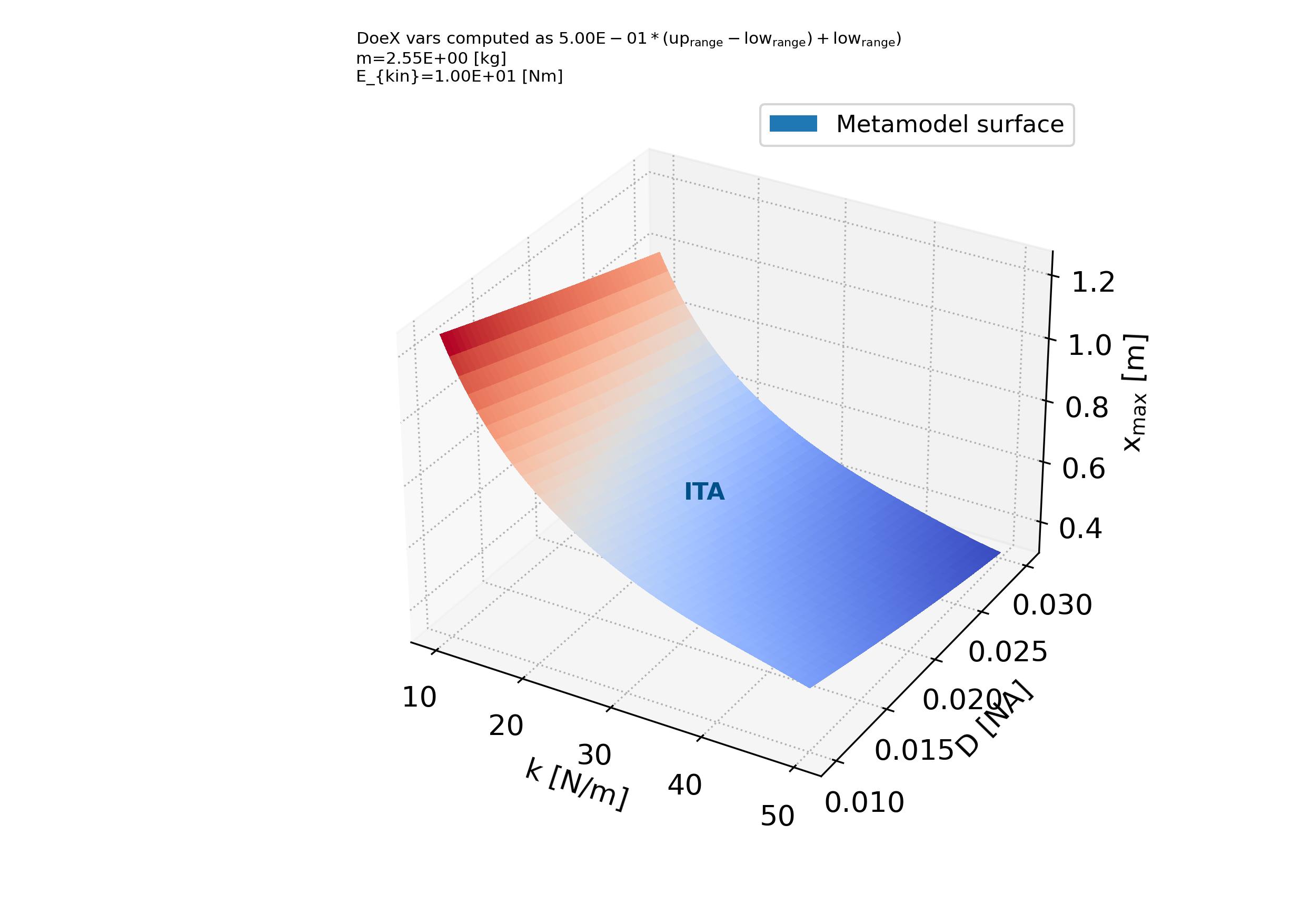
4.9. Tutorial case A09: “Loading DOEs from file, couple function case”

Based in the tutorial related with the coupled function, in this tutorial is described how to load tables of data as DOEX and DOEY input and outputs. The analysis includes the sampling, metamodeling and optimization routines.

The code to print the data structure objects are described in the script as follows in test_analysis.py,

Listing 4.9.1 Coupled function test analysis. Loading DOEX and DOEY data.
  1
  2## Analytical model,
  3##
  4
  5import os, sys, random
  6import numpy as np
  7import gc
  8
  9import pymetamodels
 10import coupled_function_model as model_obj
 11
 12class analysis(object):
 13
 14    """
 15
 16    .. _model_coupled_function_obj_conf:
 17
 18    **Synopsis:**
 19        * Analysis framework with pymetamodels
 20        * Coupled function tutorial
 21
 22    """
 23
 24    def __init__(self):
 25
 26        ## Initial variables
 27        self.name = "coupled_function_load_DOEs"
 28        self.folder_script = os.path.dirname(os.path.realpath(__file__))
 29
 30        self.folder_path_inputs = self.folder_script
 31
 32        self.folder_path_outputs = os.path.join(os.path.join(os.path.join(self.folder_script, os.pardir), "_examples_raw"),self.name + "_out")
 33        if not os.path.exists(self.folder_path_outputs): os.makedirs(self.folder_path_outputs)
 34
 35        self.file_name_inputs = r"configuration_spreadsheet"
 36        self.file_name_outputs = r"outputs"
 37
 38        ## Initialise 
 39        self.mita = pymetamodels.load()
 40        self.mita.logging_start(self.folder_path_outputs)
 41
 42    def run_model(self):
 43
 44        ## Build programatically configuration sheet
 45        _conf = self.mita.objconf()
 46        _conf.start(self.folder_path_inputs, self.file_name_inputs)
 47
 48        _conf.add_case("case_1","case_1_vars_sensi","case_out",1024,"DGSM")
 49        _conf.add_case("case_2","case_1_vars_sensi","case_out_2",256,"DGSM")
 50
 51        _conf.add_vars_sheet_variable("case_1_vars_sensi","X1", 1, -3.14, 3.14, "unif", True, 5/100., "[-]", "X1")
 52        _conf.add_vars_sheet_variable("case_1_vars_sensi","X2", 1, -3.14, 3.14, "unif", True, 5/100., "[-]", "X2")
 53        _conf.add_vars_sheet_variable("case_1_vars_sensi","X3", 1, -3.14, 3.14, "unif", True, 5/100., "[-]", "X3")
 54        _conf.add_vars_sheet_variable("case_1_vars_sensi","X4", 1, -3.14, 3.14, "unif", True, 5/100., "[-]", "X4")
 55        _conf.add_vars_sheet_variable("case_1_vars_sensi","X5", 1, -3.14, 3.14, "unif", True, 5/100., "[-]", "X5")
 56        _conf.add_vars_sheet_variable("case_1_vars_sensi","cte", 1., 1., 1., "unif", False, 5/100., "[-]", "cte")
 57
 58        _conf.add_output_sheet("case_out", "Y", None, "m^3", False, True, False, False, False, "function output")
 59        _conf.add_output_sheet("case_out_2", "Y", None, "m^3", False, True, False, False, False, "function output")
 60        _conf.add_output_sheet("case_out_2", "Y2", None, "m^3", False, False, False, False, False, "function output")
 61
 62        _conf.save_conf()
 63
 64        ## Inputs load
 65        self.mita.read_xls_case(self.folder_path_inputs, self.file_name_inputs)
 66
 67        """
 68        ## Save DOEX and DOEY
 69        ## Sampling, metamodeling and optimization
 70        for case in self.mita.keys():
 71
 72            ## Run samplimg cases
 73            self.mita.run_sampling_routine(case)
 74
 75            ## Run / Load model
 76            self.model_iteration(case, model_obj)            
 77
 78        self.mita.save_tofile_DOEX(self.folder_path_outputs, "DOEX")
 79        self.mita.save_tofile_DOEY(self.folder_path_outputs, "DOEY")
 80        """
 81
 82        ## Load DOEX and DOEY
 83        ## Sampling, metamodeling and optimization
 84
 85        self.mita.read_fromfile_DOEX(self.folder_path_outputs, "DOEX")
 86        self.mita.read_fromfile_DOEY(self.folder_path_outputs, "DOEY")
 87
 88        for case in self.mita.keys():
 89
 90            ## Sensitivity analysis
 91            self.mita.run_sensitivity_analisis(case)
 92
 93            ## Metamodeling construction
 94            self.mita.run_metamodel_construction(case, scheme = "general_fast")
 95
 96            ## Solve optimization problem
 97            self.mita.run_optimization_problem(case, scheme = "general_fast")                     
 98        
 99        ##
100        self.mita.run_sensitivity_normalization()
101
102        ## Ploting and others
103        for case in self.mita.keys():
104
105            ## Plots cross varible relation in the sensitivity analysis
106            self.mita.output_plts_sensitivity(self.folder_path_outputs, case)
107
108            ## Plots showing the model DOEX and DOEY variables relationship 2D XY
109            self.mita.output_plts_models_XY(self.folder_path_outputs, case)
110
111            ## Residual values plots
112            self.mita.output_plts_models_residuals_plot(self.folder_path_outputs, case)
113
114            ## Plots showing the model DOEX and DOEY variables relationship 3D XYZ
115            self.mita.output_plts_models_XYZ(self.folder_path_outputs, case)
116
117        ## Output variables save
118        folder_path = self.folder_path_outputs
119        file_name = self.file_name_outputs
120        out_path = self.mita.output_xls(folder_path, file_name, col_start = 0, tit_row = 0)
121
122    def model_iteration(self, case, _model_obj):
123
124        ## Model iteration to generate Y doe output values
125        doeX = self.mita.doeX(case)
126        doeY = self.mita.doeY(case)
127        vars_in = self.mita.vars_parameter_matrix(case)
128        case_dict = self.mita.case[case]
129        samples = len(doeX[list(doeX.keys())[0]])
130
131        for ii in range(0, samples):
132
133            obj_model = _model_obj.model_obj()
134
135            # initialize dictionaries
136            obj_model.doeX = doeX
137            obj_model.doeY = doeY
138            obj_model.case_dict = case_dict
139            obj_model.ii = ii
140            obj_model.vars_in = vars_in
141
142            # add variables as atributes
143            for key in obj_model.doeX.keys():
144                setattr(obj_model, key, obj_model.doeX[key][obj_model.ii])
145
146            # run the model for ii sample
147            obj_model.run_model()
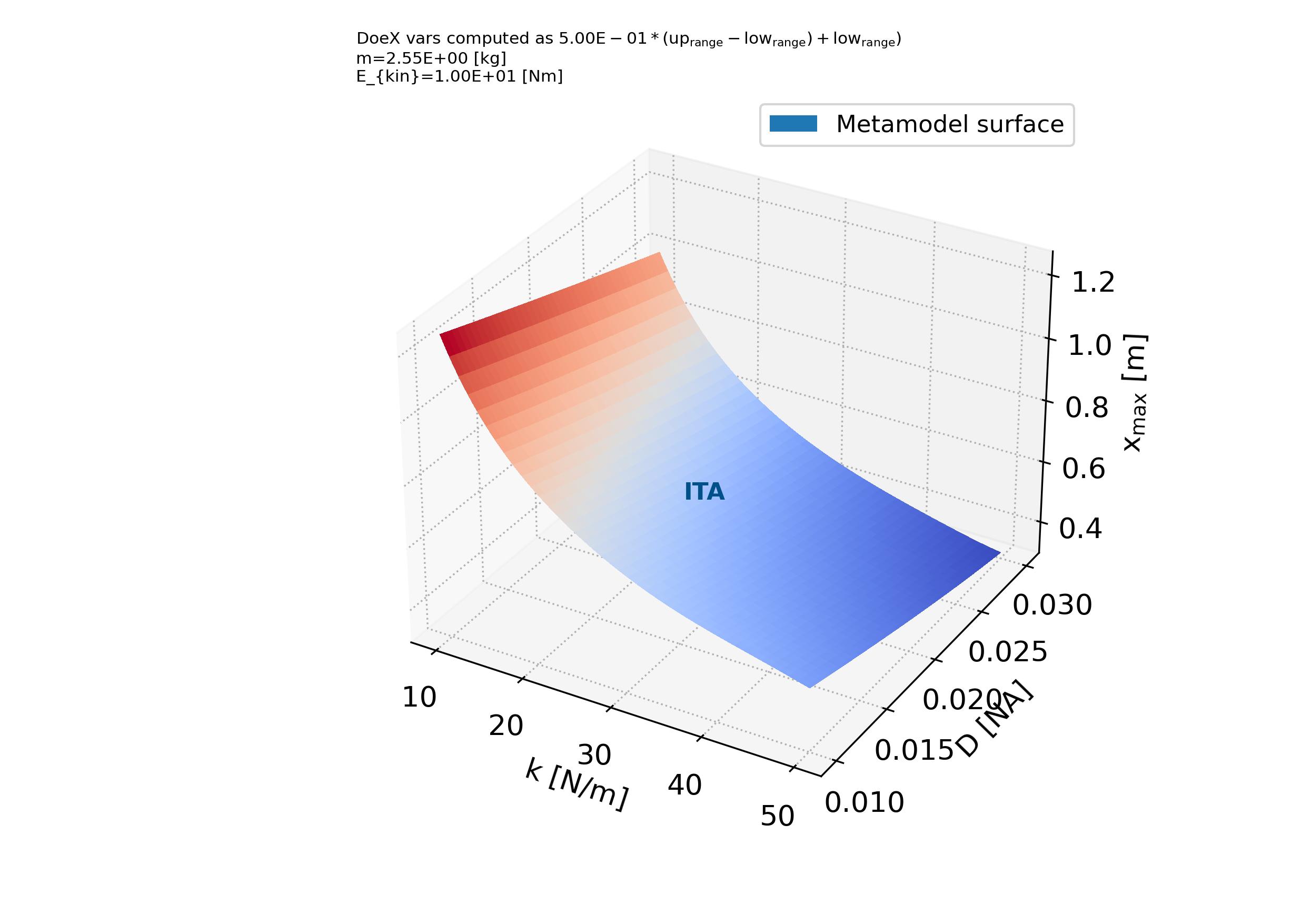
148
149if __name__ == "__main__":
150
151    analysis = analysis()
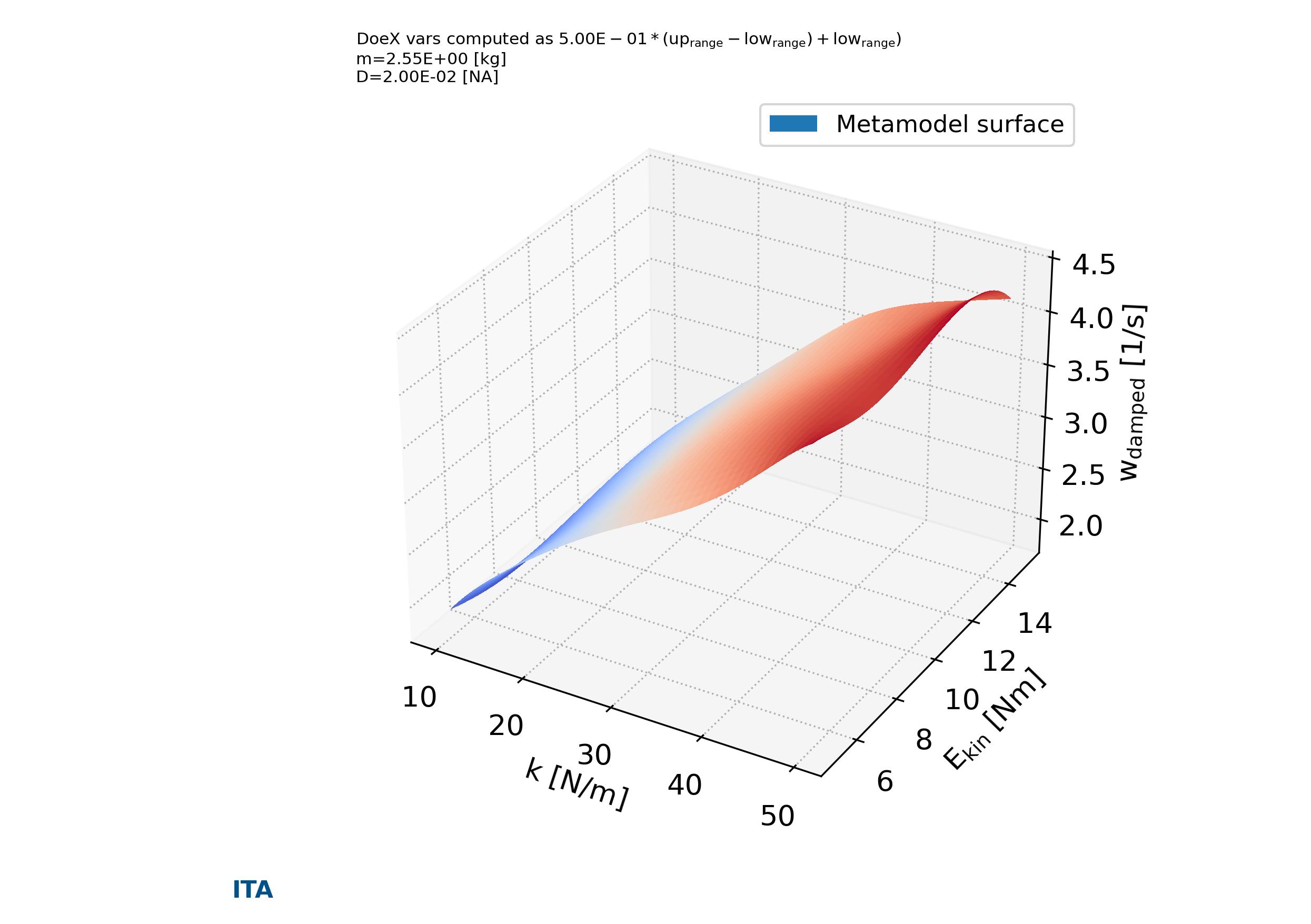
152
153    analysis.run_model()